
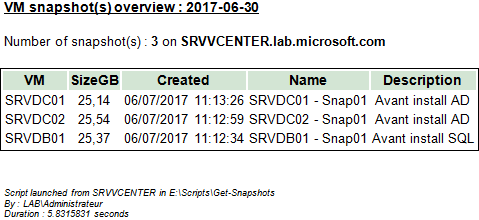
Ce script créé par mes soins permet de lister l'ensemble des snapshots existants sur le vCenter et d'envoyer le résultat par mail sous la forme d'un rapport.
Fonctionnalités :
- Lister l'ensemble des snapshots existants sur le vCenter
- Envoyer un rapport par mail uniquement s'il existe au moins un snapshot sur le vCenter afin de limiter les mails
Prérequis :
- Avoir les droits administrateur sur la plateforme VMware
- Installer la dernière version des VMware PowerCLI
Utilisation :
- Compléter les variables suivantes dans le script :
- $vCenter = "vCenterServerName" (Serveur vCenter)
- $MailFrom = "UserName[at]mail.fr" (Adresse mail de l'expéditeur)
- $MailTo = "UserName[at]mail.fr" (Adresse mail du destinataire)
- $MailCc = "UserName[at]mail.fr" (Adresse mail de la personne à mettre en copie)
- $MailSMTPServer = "SMTPServerName" (Serveur SMTP)
Screenshot :
Code du script :
<#
.SYNOPSIS
    Retrieves VM snapshots on your VMware vCenter Server.
.DESCRIPTION
    Retrieves and send by e-mail all VM snapshots on your VMware vCenter Server.
.NOTES
    File name : Get-Snapshots.ps1
    Author : Pierre JACQUOT
    Date : 30/05/2016
    Version : 1.0
.LINK
    Website : https://www.pierrejacquot.yo.fr
    Reference : https://www.pierrejacquot.yo.fr/index.php/scripts/40-script-get-snapshots
#>

Clear-Host

# List of variables
$StartTime = Get-Date -Format "dd/MM/yyyy HH:mm:ss"
[string]$Hostname = [Environment]::MachineName
[string]$Login = [System.Security.Principal.WindowsIdentity]::GetCurrent().Name
[string]$Workfolder = Split-Path $MyInvocation.MyCommand.Path
[string]$Date = Get-Date -UFormat "%Y-%m-%d"
[string]$CSVFile = $Workfolder + "\$Date-Snapshots-Export.csv"
[string]$ReportFile = $Workfolder + "\$Date-Snapshots-Report.html"
[string]$vCenter = "vCenterServerName"
[string]$Table = $Null

Write-Host "Get-Snapshots :" -ForegroundColor Black -BackgroundColor Yellow

# Trying to connect to the VMware vCenter Server
Try {
    $Connexion = Connect-VIServer -Server $vCenter
    Write-Host "Connected on the VMware vCenter Server : $Connexion" -ForegroundColor Green
}
Catch {
    Write-Host "[ERROR] : Unable to connect on the VMware vCenter Server" -ForegroundColor Red
    Exit
}

# Retrieves and count VM snapshot(s) on the VMware vCenter Server
[array]$Snapshots = (Get-VM | Get-Snapshot | Sort-Object Created -Descending | Select-Object VM, @{Name="SizeGB";Expression={"{0:N2}" -f $_.SizeGB}}, Created, Name, Description)
[int]$SnapshotsNumber = $Snapshots.Count

If ($SnapshotsNumber -ge 1) {
    # Send-MailMessage parameters
    [string]$MailFrom = "vCenter[at]mail.fr"
    [string]$MailTo = @('UserName[at]mail.fr')
    [string]$MailCc = @('UserName[at]mail.fr')
    [string]$MailSubject = "[$Date] - [VMware] - Snapshot(s) daily report on : $vCenter"
    [string]$MailSMTPServer = "SMTPServerName"

    [string]$MailBody = '<html>'
    $MailBody += '<head>'
    $MailBody += "<title>$MailSubject</title>"
    $MailBody += '<style type="text/css">'
    $MailBody += 'h1 { font-family: Arial; color: #e68a00; font-size: 28px; }'
    $MailBody += 'h2 { font-family: Arial; color: #000000; font-size: 16px; }'
    $MailBody += '.customTable { border: 1px solid #000000; }'
    $MailBody += '.customTable table { border-collapse: collapse; border-spacing: 0; margin: 0px; padding: 0px; }'
    $MailBody += '.customTable th { background-color: #d3e5d4; font-size: 14px; font-family: Arial; font-weight: bold; }'
    $MailBody += '.customTable td { font-size: 13px; font-family: Arial; }'
    $MailBody += '.customTable tr:nth-child(even) { background-color: #f0f0f2; }'
    $MailBody += '.customTable tr:hover { background-color: #ddd; }'
    $MailBody += '#PostInfo { font-family: Arial; font-size: 11px; font-style: italic; }'
    $MailBody += 'span.Info { color: #000099; }'
    $MailBody += '</style>'
    $MailBody += '</head>'

    $MailBody += '<body>'
    $MailBody += "<h1>$MailSubject</h1>"
    $MailBody += "<h2>Number of snapshot(s) : <span class='Info'>$SnapshotsNumber</span></h2>"

    # Prepare Table
    $Table += '<table class="customTable">'
    $Table += "<tr><th>VM</th><th>SizeGB</th><th>Created</th><th>Name</th><th>Description</th></tr>"

    Foreach ($Snapshot in $Snapshots) {
        [string]$SnapVM = ($Snapshot.VM).Name
        $SnapSizeGB = "{0:N2}" -f $Snapshot.SizeGB
        $SnapCreated = $Snapshot.Created
        [string]$SnapName = $Snapshot.Name
        [string]$SnapDescription = $Snapshot.Description

        $Table += "<tr><td>$SnapVM</td><td>$SnapSizeGB</td><td>$SnapCreated</td><td>$SnapName</td><td>$SnapDescription</td></tr>"
    }

    $Table += "</table>"

    $Snapshots | Export-Csv -Path $CSVFile -NoTypeInformation -Delimiter ";" -Encoding UTF8
    $EndTime = Get-Date -Format "dd/MM/yyyy HH:mm:ss"
    [decimal]$Duration = [math]::Round((New-TimeSpan -Start $StartTime -End $EndTime).TotalSeconds,2)

    [string]$Info = "<p id='PostInfo'>Script launched from : <span class='Info'>$Hostname</span><br/>
    By : <span class='Info'>$Login</span><br/>
    Path : <span class='Info'>$Workfolder</span><br/>
    CSV file : <span class='Info'>$(Split-Path $CSVFile -Leaf)</span><br/>
    Report file : <span class='Info'>$(Split-Path $ReportFile -Leaf)</span><br/>
    Start time : <span class='Info'>$StartTime</span><br/>
    End time : <span class='Info'>$EndTime</span><br/>
    Duration : <span class='Info'>$Duration</span> second(s)</p>"

    $MailBody += $Table
    $MailBody += $Info
    $MailBody += '</body>'
    $MailBody += '</html>'

    $MailBody | Out-File -FilePath $ReportFile

    $Snapshots | Format-Table

    Try {
        Send-MailMessage -From $MailFrom -To $MailTo -Cc $MailCc -Subject $MailSubject -Body $MailBody -Priority High -Attachments $ReportFile -SmtpServer $MailSMTPServer -BodyAsHtml -Encoding UTF8
        Write-Host "VM snapshot(s) report with attached file : $(Split-Path $ReportFile -Leaf) has been sent by e-mail" -ForegroundColor Green
    }
    Catch {
        [string]$ErrorMessage = $_.Exception.Message
        Write-Host $ErrorMessage -ForegroundColor Red
    }
    Disconnect-VIServer -Server $vCenter -Confirm:$false
}
Else {
    Disconnect-VIServer -Server $vCenter -Confirm:$false
}

Write-Host "`r"
Write-Host "Script launched from : " -NoNewline; Write-Host $Hostname -ForegroundColor Red
Write-Host "By : " -NoNewline; Write-Host $Login -ForegroundColor Red
Write-Host "Path : " -NoNewline; Write-Host $Workfolder -ForegroundColor Red
Write-Host "CSV file : " -NoNewline; Write-Host (Split-Path $CSVFile -Leaf) -ForegroundColor Red
Write-Host "Report file : " -NoNewline; Write-Host (Split-Path $ReportFile -Leaf) -ForegroundColor Red
Write-Host "Start time : " -NoNewline; Write-Host $StartTime -ForegroundColor Red
Write-Host "End time : " -NoNewline; Write-Host $EndTime -ForegroundColor Red
Write-Host "Duration : " -NoNewline; Write-Host $Duration -ForegroundColor Red -nonewline; Write-Host " second(s)"
Write-Host "`r"
Il ne reste plus qu'à planifier l'exécution du script via un ordonnanceur.
Cliquer ici pour visualiser un exemple du rapport Snapshots-Report.html créé automatiquement.
Cliquer ici pour télécharger le script.