

Sans partage, la connaissance n'est rien !
Fil de navigation
- Vous êtes ici :
-
Accueil

- Scripts
- Détails
- Écrit par Pierre JACQUOT
- Catégorie : Scripts
- Affichages : 266

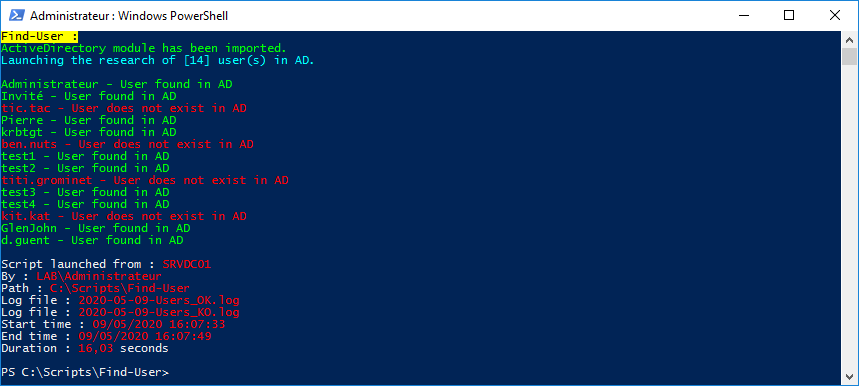
Ce script créé par mes soins permet de vérifier si les utilisateurs (logins stockés dans un fichier texte) existent dans l'AD.
Fonctionnalités :
- Vérifie la présence des utilisateurs (logins stockés dans un fichier texte) dans l'AD
- Création de 2 fichiers de logs horodatés et séparés (Users_OK & Users_KO)
- Exporter les données dans un fichier .csv
- Exporter les données dans un rapport HTML
Prérequis :
- Afin de pouvoir exécuter le script, il faut installer le Module Active Directory pour Windows PowerShell (Présent dans les [RSAT] : Outils d’administration de serveur distant pour Windows 7 et Windows 10)
Utilisation :
- Compléter le fichier Logins.txt avec les logins des comptes à rechercher sur l'AD
Exemple du fichier Logins.txt avec les logins des comptes AD :
Administrateur
Invité
tic.tac
Pierre
krbtgt
ben.nuts
test1
test2
titi.grominet
test3
test4
kit.kat
GlenJohn
d.guent
Screenshot :
Code du script :
<#
.SYNOPSIS
    Find AD users.
.DESCRIPTION
    Check if users exist in AD.
.NOTES
    File name : Find-User.ps1
    Author : Pierre JACQUOT
    Date : 14/05/2016
    Version : 1.0
.LINK
    Website : https://www.pierrejacquot.yo.fr
    Reference : https://www.pierrejacquot.yo.fr/index.php/scripts/26-script-find-user
#>

Clear-Host

Function Write-Log([string]$Output, [string]$Message) {
    Write-Verbose $Message
    ((Get-Date -UFormat "[%d/%m/%Y %H:%M:%S] ") + $Message) | Out-File -FilePath $Output -Append -Force
}

$StartTime = Get-Date -Format "dd/MM/yyyy HH:mm:ss"
[string]$Hostname = [Environment]::MachineName
[string]$Login = [System.Security.Principal.WindowsIdentity]::GetCurrent().Name
[string]$Workfolder = Split-Path $MyInvocation.MyCommand.Path
[string]$Date = Get-Date -UFormat "%Y-%m-%d"
[string]$TXTFile = $Workfolder + "\Logins.txt"
[string]$ReportFile = $Workfolder + "\$Date-Users-Report.html"
[string]$LogFileOK = $Workfolder + "\$Date-Users_OK.log"
[string]$LogFileKO = $Workfolder + "\$Date-Users_KO.log"
[array]$Logins = Get-Content -Path ".\Logins.txt" -ErrorAction SilentlyContinue
[int]$LineNumbers = $Logins.Count
[System.Collections.ArrayList]$UserList = @()
[string]$Activity = "Trying to launch the research of [$LineNumbers] user(s) in AD"
[int]$Step = 1
[string]$Title = "[$Date] - AD user(s) report on : $Hostname"

Write-Host "Find-User :" -ForegroundColor Black -BackgroundColor Yellow
Try {
    Import-Module ActiveDirectory -ErrorAction Stop
    Write-Host "ActiveDirectory module has been imported." -ForegroundColor Green
    Write-Log -Output $LogFileOK -Message "ActiveDirectory module has been imported."
}
Catch {
    Write-Warning "The ActiveDirectory module failed to load. Install the module and try again."
    Write-Log -Output $LogFileKO -Message "The ActiveDirectory module failed to load. Install the module and try again."
    Pause
    Write-Host "`r"
    Exit
}

If ((Test-Path ".\Logins.txt") -eq $False) {
    Write-Warning "TXT file [Logins.txt] does not exist."
    Write-Log -Output $LogFileKO -Message "TXT file [Logins.txt] does not exist."
}
ElseIf ($LineNumbers -eq 0) {
    Write-Warning "TXT file [Logins.txt] is empty."
    Write-Log -Output $LogFileKO -Message "TXT file [Logins.txt] is empty."
}
Else {
    Write-Host "Launching the research of [$LineNumbers] user(s) in AD." -ForegroundColor Cyan
    Write-Host "`r"
    ForEach ($ADLogin in $Logins) {
        [string]$Status = "Processing [$Step] of [$LineNumbers] - $(([math]::Round((($Step)/$LineNumbers*100),0)))% completed"
        [string]$CurrentOperation = "Finding AD user : $ADLogin"
        Write-Progress -Activity $Activity -Status $Status -CurrentOperation $CurrentOperation -PercentComplete ($Step/$LineNumbers*100)
        $Step++
        Start-Sleep -Seconds 1
        Try {
            $User = Get-ADUser -Filter { sAMAccountName -eq $ADLogin }
        }
        Catch {
            [string]$ErrorMessage = $_.Exception.Message
            Write-Host $ErrorMessage -ForegroundColor Red
            Write-Host "`r"
            Write-Log -Output $LogFileKO -Message $ErrorMessage
        }
        If ($User -eq $Null) {
            [string]$UserExist = "KO"
            Write-Host "$ADLogin - User does not exist in AD." -ForegroundColor Red
            Write-Log -Output $LogFileKO -Message "$ADLogin - User does not exist in AD."
        }
        Else {
            $UserExist = "OK"
            Write-host "$ADLogin - User found in AD." -ForegroundColor Green
            Write-Log -Output $LogFileOK -Message "$ADLogin - User found in AD."
        }
        $ServerObject = [PSCustomObject]@{
            sAMAccountName = $ADLogin
            Status = $UserExist
        }
        $UserList.Add($ServerObject) | Out-Null
    }
}

$EndTime = Get-Date -Format "dd/MM/yyyy HH:mm:ss"
[decimal]$Duration = [math]::Round((New-TimeSpan -Start $StartTime -End $EndTime).TotalSeconds,2)
[string]$PreContent = "<h1>$Title</h1>
<h2>Number of AD user(s) : <span class='PostContentBlue'>$LineNumbers</span></h2>"
[string]$SuccessLogFile = "Success log file : <span class='PostContentBlue'>$(Split-Path $LogFileOK -Leaf)</span><br/>"
[string]$WarningLogFile = "Warning log file : <span class='PostContentBlue'>$(Split-Path $LogFileKO -Leaf)</span><br/>"
[string]$PostContent = "<p id='PostContent'>Script launched from : <span class='PostContentBlue'>$Hostname</span><br/>
By : <span class='PostContentBlue'>$Login</span><br/>
Path : <span class='PostContentBlue'>$Workfolder</span><br/>
TXT file : <span class='PostContentBlue'>$(Split-Path $TXTFile -Leaf)</span><br/>
Report file : <span class='PostContentBlue'>$(Split-Path $ReportFile -Leaf)</span><br/>
$(If ((Test-Path $LogFileOK) -eq $True) {
    $SuccessLogFile
})
$(If ((Test-Path $LogFileKO) -eq $True) {
    $WarningLogFile
})
Start time : <span class='PostContentBlue'>$StartTime</span><br/>
End time : <span class='PostContentBlue'>$EndTime</span><br/>
Duration : <span class='PostContentBlue'>$Duration</span> second(s)</p>"
[string]$Report = $UserList | ConvertTo-Html -As Table -CssUri ".\Style.css" -Title $Title -PreContent $PreContent -PostContent $PostContent
$Report = $Report -replace '<td>OK</td>','<td class="SuccessStatus">OK</td>'
$Report = $Report -replace '<td>KO</td>','<td class="CriticalStatus">KO</td>'
$Report | Out-File -FilePath $ReportFile -Encoding utf8

Write-Host "`r"
Write-Host "Script launched from : " -NoNewline; Write-Host $Hostname -ForegroundColor Red
Write-Host "By : " -NoNewline; Write-Host $Login -ForegroundColor Red
Write-Host "Path : " -NoNewline; Write-Host $Workfolder -ForegroundColor Red
Write-Host "TXT file : " -NoNewline; Write-Host (Split-Path $TXTFile -Leaf) -ForegroundColor Red
Write-Host "Report file : " -NoNewline; Write-Host (Split-Path $ReportFile -Leaf) -ForegroundColor Red
If ((Test-Path $LogFileOK) -eq $True) {
    Write-Host "Log file : " -NoNewline; Write-Host (Split-Path $LogFileOK -Leaf) -ForegroundColor Red
}
If ((Test-Path $LogFileKO) -eq $True) {
    Write-Host "Log file : " -NoNewline; Write-Host (Split-Path $LogFileKO -Leaf) -ForegroundColor Red
}
Write-Host "Start time : " -NoNewline; Write-Host $StartTime -ForegroundColor Red
Write-Host "End time : " -NoNewline; Write-Host $EndTime -ForegroundColor Red
Write-Host "Duration : " -NoNewline; Write-Host $Duration -ForegroundColor Red -nonewline; Write-Host " second(s)"
Write-Host "`r"
Exemple du fichier Users_OK.log créé automatiquement avec les logins qui existent dans l'AD :
[09/05/2020 16:07:33] ActiveDirectory module has been imported.
[09/05/2020 16:07:34] Administrateur - User found in AD.
[09/05/2020 16:07:35] Invité - User found in AD.
[09/05/2020 16:07:38] Pierre - User found in AD.
[09/05/2020 16:07:39] krbtgt - User found in AD.
[09/05/2020 16:07:41] test1 - User found in AD.
[09/05/2020 16:07:42] test2 - User found in AD.
[09/05/2020 16:07:44] test3 - User found in AD.
[09/05/2020 16:07:45] test4 - User found in AD.
[09/05/2020 16:07:48] GlenJohn - User found in AD.
[09/05/2020 16:07:49] d.guent - User found in AD.
Exemple du fichier Users_KO.log créé automatiquement avec les logins qui n'existent pas dans l'AD :
[09/05/2020 16:07:37] tic.tac - User does not exist in AD.
[09/05/2020 16:07:40] ben.nuts - User does not exist in AD.
[09/05/2020 16:07:43] titi.grominet - User does not exist in AD.
[09/05/2020 16:07:46] kit.kat - User does not exist in AD.
Cliquer ici pour visualiser un exemple du rapport Users-Report.html créé automatiquement.
Cliquer ici pour télécharger le fichier de style css.
Cliquer ici pour télécharger le script.
- Détails
- Écrit par Pierre JACQUOT
- Catégorie : Scripts
- Affichages : 196

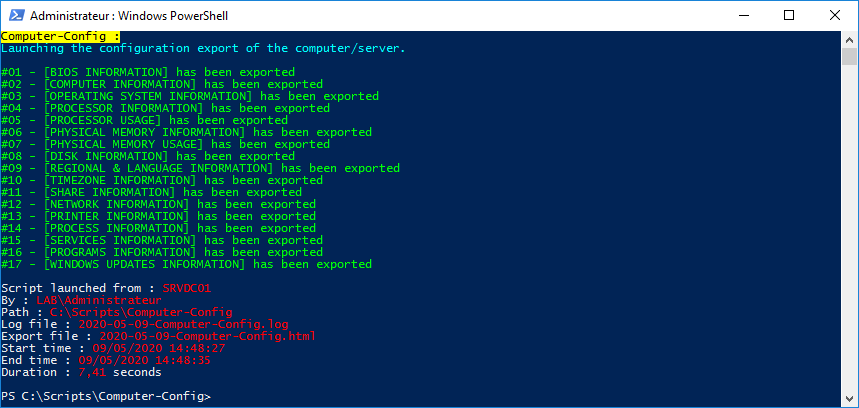
Ce script créé par mes soins permet de récupérer la configuration (système, hardware) complète d'un ordinateur / serveur.
Fonctionnalités :
Avec cet outil, vous pouvez récupérer les informations suivantes dans un fichier HTML :
- La configuration du bios
- La configuration de l'ordinateur
- La configuration du système d'exploitation
- La configuration du processeur
- L'utilisation du processeur
- La configuration de la mémoire
- L'utilisation de la mémoire
- La configuration du stockage
- La configuration de la région et de la langue
- La configuration du fuseau horaire
- La configuration des partages réseau
- La configuration réseau
- La configuration des imprimantes
- La liste des processus
- La liste des services
- La liste des programmes installés (packages msi)
- La liste des programmes installés (32 bits)
- La liste des programmes installés (64 bits)
- La liste des mises à jour installées
Screenshot :
Code du script :
<#
.SYNOPSIS
    Detailed computer/server config information.
.DESCRIPTION
    Export the detailed configuration of a computer/server.
.NOTES
    File name : Computer-Config.ps1
    Author : Pierre JACQUOT
    Date : 10/11/2015
    Version : 1.0
.LINK
    Website : https://www.pierrejacquot.yo.fr
    Reference : https://www.pierrejacquot.yo.fr/index.php/scripts/25-script-computer-config
#>

Clear-Host

Function Write-Log([string]$Output, [string]$Message) {
    Write-Verbose $Message
    ((Get-Date -UFormat "[%d/%m/%Y %H:%M:%S] ") + $Message) | Out-File -FilePath $Output -Append -Force
}

$StartTime = Get-Date -Format "dd/MM/yyyy HH:mm:ss"
[string]$Hostname = [Environment]::MachineName
[string]$Login = [System.Security.Principal.WindowsIdentity]::GetCurrent().Name
[string]$Workfolder = Split-Path $MyInvocation.MyCommand.Path
[string]$Date = Get-Date -UFormat "%Y-%m-%d"
[string]$LogFile = $Workfolder + "\$Date-Computer-Config.log"
[string]$ReportFile = $Workfolder + "\$Date-Computer-Config-Report.html"
[string]$BiosStep = "#01 - [BIOS INFORMATION]"
[string]$ComputerStep = "#02 - [COMPUTER INFORMATION]"
[string]$OSStep = "#03 - [OPERATING SYSTEM INFORMATION]"
[string]$CPUStep = "#04 - [PROCESSOR INFORMATION]"
[string]$CPUUsageStep = "#05 - [PROCESSOR USAGE]"
[string]$RAMStep = "#06 - [PHYSICAL MEMORY INFORMATION]"
[string]$RAMUsageStep = "#07 - [PHYSICAL MEMORY USAGE]"
[string]$HDDStep = "#08 - [DISK INFORMATION]"
[string]$LanguageStep = "#09 - [REGIONAL & LANGUAGE INFORMATION]"
[string]$TimeZoneStep = "#10 - [TIMEZONE INFORMATION]"
[string]$ShareStep = "#11 - [SHARE INFORMATION]"
[string]$NetworkStep = "#12 - [NETWORK INFORMATION]"
[string]$PrinterStep = "#13 - [PRINTER INFORMATION]"
[string]$ProcessStep = "#14 - [PROCESS INFORMATION]"
[string]$ServicesStep = "#15 - [SERVICES INFORMATION]"
[string]$ProgramsStep = "#16 - [PROGRAMS INFORMATION]"
[string]$Programs32Step = "#17 - [PROGRAMS INFORMATION - HKLM:\SOFTWARE]"
[string]$Programs64Step = "#18 - [PROGRAMS INFORMATION - HKLM:\SOFTWARE\Wow6432Node]"
[string]$UpdatesStep = "#19 - [WINDOWS UPDATES INFORMATION]"
[string]$RegKey1 = "HKLM:\SOFTWARE\Microsoft\Windows\CurrentVersion\Uninstall\*"
[string]$RegKey2 = "HKLM:\SOFTWARE\Wow6432Node\Microsoft\Windows\CurrentVersion\Uninstall\*"
[string]$Activity = "Trying to launch the configuration export of the computer/server"
[int]$Step = 1
[int]$TotalStep = 19
[string]$Title = "[$Date] - Computer config report on : $Hostname"
[string]$TitleHTML = "<h1>$Title</h1>"

Write-Host "Computer-Config :" -ForegroundColor Black -BackgroundColor Yellow
Write-Host "Launching the configuration export of the computer/server." -ForegroundColor Cyan
Write-Host "`r"

[string]$Status = "Processing [$Step] of [$TotalStep] - $(([math]::Round((($Step)/$TotalStep*100),0)))% completed"
Write-Progress -Activity $Activity -Status $Status -CurrentOperation $BiosStep -PercentComplete ($Step/$TotalStep*100)
[string]$BiosInfoHTML = Get-CimInstance -ClassName Win32_BIOS | Select-Object Manufacturer, Name, ReleaseDate, SMBIOSBIOSVersion, SerialNumber | ConvertTo-Html -As Table -Fragment -PreContent "<h2>$BiosStep :</h2>"
Write-Host "$BiosStep has been exported." -ForegroundColor Green
Write-Log -Output $LogFile -Message "$BiosStep has been exported."

$Step++
[string]$Status = "Processing [$Step] of [$TotalStep] - $(([math]::Round((($Step)/$TotalStep*100),0)))% completed"
Write-Progress -Activity $Activity -Status $Status -CurrentOperation $ComputerStep -PercentComplete ($Step/$TotalStep*100)
[string]$ComputerInfoHTML = Get-CimInstance -ClassName Win32_ComputerSystem | Select-Object Name, Manufacturer, Model, Domain, PrimaryOwnerName | ConvertTo-Html -As Table -Fragment -PreContent "<h2>$ComputerStep :</h2>"
Write-Host "$ComputerStep has been exported." -ForegroundColor Green
Write-Log -Output $LogFile -Message "$ComputerStep has been exported."

$Step++
[string]$Status = "Processing [$Step] of [$TotalStep] - $(([math]::Round((($Step)/$TotalStep*100),0)))% completed"
Write-Progress -Activity $Activity -Status $Status -CurrentOperation $OSStep -PercentComplete ($Step/$TotalStep*100)
[string]$OSInfoHTML = Get-CimInstance -ClassName Win32_OperatingSystem | Select-Object Manufacturer, Caption, CSDVersion, OSArchitecture, Version, BuildNumber, SystemDrive, WindowsDirectory, SystemDirectory, InstallDate, LastBootUpTime, LocalDateTime | ConvertTo-Html -As Table -Fragment -PreContent "<h2>$OSStep :</h2>"
Write-Host "$OSStep has been exported." -ForegroundColor Green
Write-Log -Output $LogFile -Message "$OSStep has been exported."

$Step++
[string]$Status = "Processing [$Step] of [$TotalStep] - $(([math]::Round((($Step)/$TotalStep*100),0)))% completed"
Write-Progress -Activity $Activity -Status $Status -CurrentOperation $CPUStep -PercentComplete ($Step/$TotalStep*100)
[string]$CPUInfoHTML1 = Get-CimInstance -ClassName Win32_Processor | Select-Object Manufacturer, Name, Caption, MaxClockSpeed, NumberOfCores, NumberOfLogicalProcessors, LoadPercentage | ConvertTo-Html -As Table -Fragment -PreContent "<h2>$CPUStep :</h2>"
Write-Host "$CPUStep has been exported." -ForegroundColor Green
Write-Log -Output $LogFile -Message "$CPUStep has been exported."

$Step++
[string]$Status = "Processing [$Step] of [$TotalStep] - $(([math]::Round((($Step)/$TotalStep*100),0)))% completed"
Write-Progress -Activity $Activity -Status $Status -CurrentOperation $CPUUsageStep -PercentComplete ($Step/$TotalStep*100)
[string]$CPUInfoHTML2 = Get-CimInstance -ClassName Win32_Processor | Measure-Object -Property LoadPercentage -Average | Select-Object @{Name="Used CPU (%)";Expression={$_.Average}}, @{Name="Free CPU (%)";Expression={"{0:N0}" -f ((100)-($_.Average))}} | ConvertTo-Html -As Table -Fragment -PreContent "<h2>$CPUUsageStep :</h2>"
Write-Host "$CPUUsageStep has been exported." -ForegroundColor Green
Write-Log -Output $LogFile -Message "$CPUUsageStep has been exported."

$Step++
[string]$Status = "Processing [$Step] of [$TotalStep] - $(([math]::Round((($Step)/$TotalStep*100),0)))% completed"
Write-Progress -Activity $Activity -Status $Status -CurrentOperation $RAMStep -PercentComplete ($Step/$TotalStep*100)
[array]$RAMInfo1 = Get-CimInstance -ClassName Win32_PhysicalMemory | Select-Object Tag, DeviceLocator, PartNumber, SerialNumber, @{Name="Installed memory (Go)";Expression={$_.Capacity/1024/1024}}
[int]$RAMNumbers = $RAMInfo1.Count
[string]$RAMInfoHTML1 = $RAMInfo1 | ConvertTo-Html -As Table -Fragment -PreContent "<h2>$RAMStep :</h2><ul><li>Number of memory card(s) : <span class='PostContentBlue'><strong>$RAMNumbers</strong></span></li></ul>"
Write-Host "$RAMStep has been exported." -ForegroundColor Green
Write-Log -Output $LogFile -Message "$RAMStep has been exported."

$Step++
[string]$Status = "Processing [$Step] of [$TotalStep] - $(([math]::Round((($Step)/$TotalStep*100),0)))% completed"
Write-Progress -Activity $Activity -Status $Status -CurrentOperation $RAMUsageStep -PercentComplete ($Step/$TotalStep*100)
[array]$RAMInfo2 = Get-CimInstance -ClassName Win32_OperatingSystem | Select-Object @{Name="Total Physical Memory (Go)";Expression={"{0:N2}" -f ($_.TotalVisibleMemorySize/1024/1024)}}, @{Name="Used Physical Memory (Go)";Expression={"{0:N2}" -f (($_.TotalVisibleMemorySize/1024/1024)-($_.FreePhysicalMemory/1024/1024))}}, @{Name="Free Physical Memory (Go)";Expression={"{0:N2}" -f ($_.FreePhysicalMemory/1024/1024)}}, @{Name="Used Memory (%)"; Expression={"{0:N0}" -f (((($_.TotalVisibleMemorySize)-($_.FreePhysicalMemory))*100)/($_.TotalVisibleMemorySize))}}, @{Name = "Free Memory (%)";Expression={“{0:N0}” -f ((($_.FreePhysicalMemory)/($_.TotalVisibleMemorySize))*100)}}
[string]$RAMInfoHTML2 = $RAMInfo2 | ConvertTo-Html -As Table -Fragment -PreContent "<h2>$RAMUsageStep :</h2>"
ForEach ($Result in $RAMInfo2) {
    [int]$ResultFreeMemory = $Result."Free Memory (%)"
    If ($ResultFreeMemory -le 9) {
        $RAMInfoHTML2 = $RAMInfoHTML2 -replace "<td>$ResultFreeMemory</td>","<td class='CriticalStatus'>$ResultFreeMemory</td>"
    }
    If ($ResultFreeMemory -le 19 -and $ResultFreeMemory -ge 10) {
        $RAMInfoHTML2 = $RAMInfoHTML2 -replace "<td>$ResultFreeMemory</td>","<td class='WarningStatus'>$ResultFreeMemory</td>"
    }
}
Write-Host "$RAMUsageStep has been exported." -ForegroundColor Green
Write-Log -Output $LogFile -Message "$RAMUsageStep has been exported."

$Step++
[string]$Status = "Processing [$Step] of [$TotalStep] - $(([math]::Round((($Step)/$TotalStep*100),0)))% completed"
Write-Progress -Activity $Activity -Status $Status -CurrentOperation $HDDStep -PercentComplete ($Step/$TotalStep*100)
[array]$DiskInfo = Get-CimInstance -ClassName Win32_Volume -Filter "DriveType=3" | Sort-Object DriveLetter | Select-Object FileSystem ,Label, DriveLetter, @{Name="Capacity (Go)";Expression={“{0:N2}” -f ($_.Capacity/1024/1024/1024)}}, @{Name = "Used Space (Go)";Expression={“{0:N2}” -f (($_.Capacity/1024/1024/1024)-($_.FreeSpace/1024/1024/1024))}}, @{Name="Free Space (Go)";Expression={“{0:N2}” -f ($_.FreeSpace/1024/1024/1024)}}, @{Name = "Used Space (%)";Expression={“{0:N0}” -f (((($_.Capacity)-($_.FreeSpace))/($_.Capacity))*100)}}, @{Name = "Free Space (%)";Expression={“{0:N0}” -f ((($_.FreeSpace)/($_.Capacity))*100)}}
[int]$DiskNumbers = $DiskInfo.Count
[string]$DiskInfoHTML = $DiskInfo | ConvertTo-Html -As Table -Fragment -PreContent "<h2>$HDDStep :</h2><ul><li>Number of drive(s) : <span class='PostContentBlue'><strong>$DiskNumbers</strong></span></li></ul>"
ForEach ($Result in $DiskInfo) {
    [int]$ResultFreeSpace = $Result."Free Space (%)"
    If ($ResultFreeSpace -le 9) {
        $DiskInfoHTML = $DiskInfoHTML -replace "<td>$ResultFreeSpace</td>","<td class='CriticalStatus'>$ResultFreeSpace</td>"
    }
    If ($ResultFreeSpace -le 19 -and $ResultFreeSpace -ge 10) {
        $DiskInfoHTML = $DiskInfoHTML -replace "<td>$ResultFreeSpace</td>","<td class='WarningStatus'>$ResultFreeSpace</td>"
    }
}
Write-Host "$HDDStep has been exported." -ForegroundColor Green
Write-Log -Output $LogFile -Message "$HDDStep has been exported."

$Step++
[string]$Status = "Processing [$Step] of [$TotalStep] - $(([math]::Round((($Step)/$TotalStep*100),0)))% completed"
Write-Progress -Activity $Activity -Status $Status -CurrentOperation $LanguageStep -PercentComplete ($Step/$TotalStep*100)
[string]$LanguageInfoHTML = Get-Culture | Select-Object LCID, KeyboardLayoutId, Name, NativeName | ConvertTo-Html -As Table -Fragment -PreContent "<h2>$LanguageStep :</h2>"
Write-Host "$LanguageStep has been exported." -ForegroundColor Green
Write-Log -Output $LogFile -Message "$LanguageStep has been exported."

$Step++
[string]$Status = "Processing [$Step] of [$TotalStep] - $(([math]::Round((($Step)/$TotalStep*100),0)))% completed"
Write-Progress -Activity $Activity -Status $Status -CurrentOperation $TimeZoneStep -PercentComplete ($Step/$TotalStep*100)
[string]$TimeZoneInfoHTML = Get-CimInstance -ClassName Win32_TimeZone | Select-Object DayLightName, Caption | ConvertTo-Html -As Table -Fragment -PreContent "<h2>$TimeZoneStep :</h2>"
Write-Host "$TimeZoneStep has been exported." -ForegroundColor Green
Write-Log -Output $LogFile -Message "$TimeZoneStep has been exported."

$Step++
[string]$Status = "Processing [$Step] of [$TotalStep] - $(([math]::Round((($Step)/$TotalStep*100),0)))% completed"
Write-Progress -Activity $Activity -Status $Status -CurrentOperation $ShareStep -PercentComplete ($Step/$TotalStep*100)
[array]$ShareInfo = Get-CimInstance -ClassName Win32_Share | Select-Object Name, Path, Description
[int]$ShareNumbers = $ShareInfo.Count
[string]$ShareInfoHTML = $ShareInfo | ConvertTo-Html -As Table -Fragment -PreContent "<h2>$ShareStep :</h2><ul><li>Number of share(s) : <span class='PostContentBlue'><strong>$ShareNumbers</strong></span></li></ul>"
Write-Host "$ShareStep has been exported." -ForegroundColor Green
Write-Log -Output $LogFile -Message "$ShareStep has been exported."

$Step++
[string]$Status = "Processing [$Step] of [$TotalStep] - $(([math]::Round((($Step)/$TotalStep*100),0)))% completed"
Write-Progress -Activity $Activity -Status $Status -CurrentOperation $NetworkStep -PercentComplete ($Step/$TotalStep*100)
[array]$NetworkInfo = Get-CimInstance -ClassName Win32_NetworkAdapterConfiguration -Filter "IPEnabled=True" | Select-Object Description, DHCPServer, DNSDomain, @{Name='DNSServerSearchOrder';Expression={($_.DNSServerSearchOrder -like '*.*.*.*') -join ','}}, @{Name='IPv4';Expression={($_.IPAddress -like '*.*.*.*') -join ','}}, @{Name='Gateway';Expression={($_.DefaultIPGateway -like '*.*.*.*') -join ','}}, @{Name='Mask';Expression={($_.IPSubnet -like '*.*.*.*') -join ','}}, MACAddress
[int]$NetworkNumbers = $NetworkInfo.Count
[string]$NetworkInfoHTML = $NetworkInfo | ConvertTo-Html -As Table -Fragment -PreContent "<h2>$NetworkStep :</h2><ul><li>Number of network adapter(s) with IP enabled : <span class='PostContentBlue'><strong>$NetworkNumbers</strong></span></li></ul>"
Write-Host "$NetworkStep has been exported." -ForegroundColor Green
Write-Log -Output $LogFile -Message "$NetworkStep has been exported."

$Step++
[string]$Status = "Processing [$Step] of [$TotalStep] - $(([math]::Round((($Step)/$TotalStep*100),0)))% completed"
Write-Progress -Activity $Activity -Status $Status -CurrentOperation $PrinterStep -PercentComplete ($Step/$TotalStep*100)
[array]$PrinterInfo = Get-CimInstance -ClassName Win32_Printer | Select-Object Name, SystemName, ShareName, DriverName, PortName, Status, Shared, Published
[int]$PrinterNumbers = $PrinterInfo.Count
[string]$PrinterInfoHTML = $PrinterInfo | ConvertTo-Html -As Table -Fragment -PreContent "<h2>$PrinterStep :</h2><ul><li>Number of printer(s) : <span class='PostContentBlue'><strong>$PrinterNumbers</strong></span></li></ul>"
Write-Host "$PrinterStep has been exported." -ForegroundColor Green
Write-Log -Output $LogFile -Message "$PrinterStep has been exported."

$Step++
[string]$Status = "Processing [$Step] of [$TotalStep] - $(([math]::Round((($Step)/$TotalStep*100),0)))% completed"
Write-Progress -Activity $Activity -Status $Status -CurrentOperation $ProcessStep -PercentComplete ($Step/$TotalStep*100)
[array]$ProcessInfo = Get-Process | Sort-Object CPU -Descending | Select-Object Handles, CPU, ID, SI, ProcessName, StartTime
[int]$ProcessNumbers = $ProcessInfo.Count
[string]$ProcessInfoHTML = $ProcessInfo | ConvertTo-Html -As Table -Fragment -PreContent "<h2>$ProcessStep :</h2><ul><li>Number of processe(s) : <span class='PostContentBlue'><strong>$ProcessNumbers</strong></span></li></ul>"
Write-Host "$ProcessStep has been exported." -ForegroundColor Green
Write-Log -Output $LogFile -Message "$ProcessStep has been exported."

$Step++
[string]$Status = "Processing [$Step] of [$TotalStep] - $(([math]::Round((($Step)/$TotalStep*100),0)))% completed"
Write-Progress -Activity $Activity -Status $Status -CurrentOperation $ServicesStep -PercentComplete ($Step/$TotalStep*100)
[array]$ServicesInfo = Get-CimInstance -ClassName Win32_Service | Sort-Object State, Name | Select-Object Name, DisplayName, ProcessId, StartMode, State
[int]$ServicesNumbers = $ServicesInfo.Count
[array]$ServicesRunningInfo = $ServicesInfo | Where-Object {$_.State -eq "Running"}
[int]$ServicesRunningNumbers = $ServicesRunningInfo.Count
[int]$ServicesStoppedNumbers = $ServicesNumbers - $ServicesRunningNumbers
[string]$ServicesInfoHTML = $ServicesInfo | ConvertTo-Html -As Table -Fragment -PreContent "<h2>$ServicesStep :</h2><ul><li>Total number of service(s) : <span class='PostContentBlue'><strong>$ServicesNumbers</strong></span></li><li>Number of running service(s) : <span class='PostContentBlue'><strong>$ServicesRunningNumbers</strong></span></li><li>Number of stopped service(s) : <span class='PostContentBlue'><strong>$ServicesStoppedNumbers</strong></span></li></ul>"
$ServicesInfoHTML = $ServicesInfoHTML -replace '<td>Running</td>','<td class="SuccessStatus">Running</td>'
$ServicesInfoHTML = $ServicesInfoHTML -replace '<td>Stopped</td>','<td class="CriticalStatus">Stopped</td>'
Write-Host "$ServicesStep has been exported." -ForegroundColor Green
Write-Log -Output $LogFile -Message "$ServicesStep has been exported."

$Step++
[string]$Status = "Processing [$Step] of [$TotalStep] - $(([math]::Round((($Step)/$TotalStep*100),0)))% completed"
Write-Progress -Activity $Activity -Status $Status -CurrentOperation $ProgramsStep -PercentComplete ($Step/$TotalStep*100)
[array]$ProgramsInfo = Get-CimInstance -ClassName Win32_Product | Sort-Object InstallDate -Descending | Select-Object Name, Version, @{Name="InstallDate"; Expression={([datetime]::ParseExact($_.InstallDate, 'yyyyMMdd', $null)).toshortdatestring()}}, InstallLocation, Vendor
[int]$ProgramsNumbers = $ProgramsInfo.Count
[string]$ProgramsInfoHTML = $ProgramsInfo | ConvertTo-Html -As Table -Fragment -PreContent "<h2>$ProgramsStep :</h2><ul><li>Number of program(s) : <span class='PostContentBlue'><strong>$ProgramsNumbers</strong></span></li></ul>"
Write-Host "$ProgramsStep has been exported." -ForegroundColor Green
Write-Log -Output $LogFile -Message "$ProgramsStep has been exported."

$Step++
[string]$Status = "Processing [$Step] of [$TotalStep] - $(([math]::Round((($Step)/$TotalStep*100),0)))% completed"
Write-Progress -Activity $Activity -Status $Status -CurrentOperation $Programs32Step -PercentComplete ($Step/$TotalStep*100)
[array]$Programs32Info = Get-ItemProperty $RegKey1 | Where-Object {$_.DisplayName} | Sort-Object -Property InstallDate -Descending | Select-Object DisplayName, DisplayVersion, @{Name="InstallDate"; Expression={([datetime]::ParseExact($_.InstallDate, 'yyyyMMdd', $null)).toshortdatestring()}}, InstallLocation, Publisher
[int]$Programs32Numbers = $Programs32Info.Count
[string]$Programs32InfoHTML = $Programs32Info | ConvertTo-Html -As Table -Fragment -PreContent "<h2>$Programs32Step :</h2><ul><li>Number of program(s) (32 bits) : <span class='PostContentBlue'><strong>$Programs32Numbers</strong></span></li></ul>"
Write-Host "$Programs32Step has been exported." -ForegroundColor Green
Write-Log -Output $LogFile -Message "$Programs32Step has been exported."

$Step++
[string]$Status = "Processing [$Step] of [$TotalStep] - $(([math]::Round((($Step)/$TotalStep*100),0)))% completed"
Write-Progress -Activity $Activity -Status $Status -CurrentOperation $Programs64Step -PercentComplete ($Step/$TotalStep*100)
[array]$Programs64Info = Get-ItemProperty $RegKey2 | Where-Object {$_.DisplayName} | Sort-Object -Property InstallDate -Descending | Select-Object DisplayName, DisplayVersion, @{Name="InstallDate"; Expression={([datetime]::ParseExact($_.InstallDate, 'yyyyMMdd', $null)).toshortdatestring()}}, InstallLocation, Publisher
[int]$Programs64Numbers = $Programs64Info.Count
[string]$Programs64InfoHTML = $Programs64Info | ConvertTo-Html -As Table -Fragment -PreContent "<h2>$Programs64Step :</h2><ul><li>Number of program(s) (64 bits) : <span class='PostContentBlue'><strong>$Programs64Numbers</strong></span></li></ul>"
Write-Host "$Programs64Step has been exported." -ForegroundColor Green
Write-Log -Output $LogFile -Message "$Programs64Step has been exported."

$Step++
[string]$Status = "Processing [$Step] of [$TotalStep] - $(([math]::Round((($Step)/$TotalStep*100),0)))% completed"
Write-Progress -Activity $Activity -Status $Status -CurrentOperation $UpdatesStep -PercentComplete ($Step/$TotalStep*100)
[array]$UpdatesInfo = Get-CimInstance -ClassName Win32_QuickFixEngineering | Sort-Object InstalledOn -Descending | Select-Object Description, HotFixID, InstalledBy, @{Name="InstallDate"; Expression={$_.InstalledOn.toshortdatestring()}}
[int]$UpdatesNumbers = $UpdatesInfo.Count
[string]$UpdatesInfoHTML = $UpdatesInfo | ConvertTo-Html -As Table -Fragment -PreContent "<h2>$UpdatesStep :</h2><ul><li>Number of Windows update(s) : <span class='PostContentBlue'><strong>$UpdatesNumbers</strong></span></li></ul>"
Write-Host "$UpdatesStep has been exported." -ForegroundColor Green
Write-Log -Output $LogFile -Message "$UpdatesStep has been exported."
"`r" | Out-File -FilePath $LogFile -Append -Force

$EndTime = Get-Date -Format "dd/MM/yyyy HH:mm:ss"
[decimal]$Duration = [math]::Round((New-TimeSpan -Start $StartTime -End $EndTime).TotalSeconds,2)

[string]$PostContent = "<p id='PostContent'>Script launched from : <span class='PostContentBlue'>$Hostname</span><br/>
By : <span class='PostContentBlue'>$Login</span><br/>
Path : <span class='PostContentBlue'>$Workfolder</span><br/>
Log file : <span class='PostContentBlue'>$(Split-Path $LogFile -Leaf)</span><br/>
Report file : <span class='PostContentBlue'>$(Split-Path $ReportFile -Leaf)</span><br/>
Start time : <span class='PostContentBlue'>$StartTime</span><br/>
End time : <span class='PostContentBlue'>$EndTime</span><br/>
Duration : <span class='PostContentBlue'>$Duration</span> second(s)</p>"
[string]$Report = ConvertTo-Html -Body "$TitleHTML $BiosInfoHTML $ComputerInfoHTML $OSInfoHTML $CPUInfoHTML1 $CPUInfoHTML2 $RAMInfoHTML1 $RAMInfoHTML2 $DiskInfoHTML $LanguageInfoHTML $TimeZoneInfoHTML $ShareInfoHTML $NetworkInfoHTML $PrinterInfoHTML $ProcessInfoHTML $ServicesInfoHTML $ProgramsInfoHTML $Programs32InfoHTML $Programs64InfoHTML $UpdatesInfoHTML" -CssUri ".\Style.css" -Title $Title -PostContent $PostContent
$Report | Out-File -FilePath $ReportFile -Encoding utf8

Write-Host "`r"
Write-Host "Script launched from : " -NoNewline; Write-Host $Hostname -ForegroundColor Red
Write-Host "By : " -NoNewline; Write-Host $Login -ForegroundColor Red
Write-Host "Path : " -NoNewline; Write-Host $Workfolder -ForegroundColor Red
Write-Host "Log file : " -NoNewline; Write-Host (Split-Path $LogFile -Leaf) -ForegroundColor Red
Write-Host "Report file : " -NoNewline; Write-Host (Split-Path $ReportFile -Leaf) -ForegroundColor Red
Write-Host "Start time : " -NoNewline; Write-Host $StartTime -ForegroundColor Red
Write-Host "End time : " -NoNewline; Write-Host $EndTime -ForegroundColor Red
Write-Host "Duration : " -NoNewline; Write-Host $Duration -ForegroundColor Red -nonewline; Write-Host " second(s)"
Write-Host "`r"
Exemple du fichier Computer-Config.log créé automatiquement avec les étapes effectuées :
[28/06/2020 15:29:18] #01 - [BIOS INFORMATION] has been exported.
[28/06/2020 15:29:18] #02 - [COMPUTER INFORMATION] has been exported.
[28/06/2020 15:29:18] #03 - [OPERATING SYSTEM INFORMATION] has been exported.
[28/06/2020 15:29:19] #04 - [PROCESSOR INFORMATION] has been exported.
[28/06/2020 15:29:20] #05 - [PROCESSOR USAGE] has been exported.
[28/06/2020 15:29:20] #06 - [PHYSICAL MEMORY INFORMATION] has been exported.
[28/06/2020 15:29:20] #07 - [PHYSICAL MEMORY USAGE] has been exported.
[28/06/2020 15:29:20] #08 - [DISK INFORMATION] has been exported.
[28/06/2020 15:29:20] #09 - [REGIONAL & LANGUAGE INFORMATION] has been exported.
[28/06/2020 15:29:20] #10 - [TIMEZONE INFORMATION] has been exported.
[28/06/2020 15:29:20] #11 - [SHARE INFORMATION] has been exported.
[28/06/2020 15:29:20] #12 - [NETWORK INFORMATION] has been exported.
[28/06/2020 15:29:20] #13 - [PRINTER INFORMATION] has been exported.
[28/06/2020 15:29:21] #14 - [PROCESS INFORMATION] has been exported.
[28/06/2020 15:29:21] #15 - [SERVICES INFORMATION] has been exported.
[28/06/2020 15:29:40] #16 - [PROGRAMS INFORMATION] has been exported.
[28/06/2020 15:29:40] #17 - [PROGRAMS INFORMATION - HKLM:\SOFTWARE] has been exported.
[28/06/2020 15:29:41] #18 - [PROGRAMS INFORMATION - HKLM:\SOFTWARE\Wow6432Node] has been exported.
[28/06/2020 15:30:01] #19 - [WINDOWS UPDATES INFORMATION] has been exported.
Cliquer ici pour visualiser un exemple du rapport Computer-Config.html créé automatiquement depuis mon poste.
Cliquer ici pour télécharger le fichier de style css.
Cliquer ici pour télécharger le script.
- Détails
- Écrit par Pierre JACQUOT
- Catégorie : Scripts
- Affichages : 223

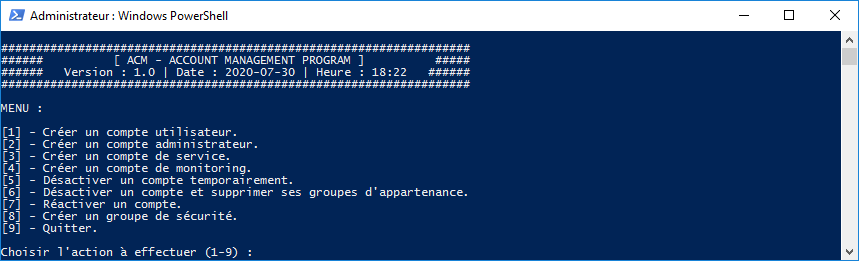
Ce script créé par mes soins permet d'effectuer plusieurs actions (présentées ci-dessous) sur l'AD.
Actions :
Avec l'ACM, vous pouvez effectuer sur Active-Directory les actions suivantes :
- Créer un compte utilisateur
- Créer un compte administrateur
- Créer un compte de service
- Créer un compte de monitoring
- Désactiver un compte temporairement
- Désactiver un compte et supprimer ses groupes d'appartenance
- Réactiver un compte
- Créer un groupe de sécurité
Fonctionnalités :
L'ACM prend en compte les fonctionnalités suivantes :
- Gestion des prénoms composés pour les comptes utilisateur et administrateur
- Création du login en automatique pour les comptes utilisateur et administrateur
- Gestion d'erreur sur le login (ne peut pas être vide et doit respecter la convention de nommage) :
- Pour un compte de service : Le login doit obligatoirement commencer par svc[i/d/r/p]_
- Pour un compte de monitoring : Le login doit obligatoirement commencer par monitoring.
- Gestion d'erreur sur le mot de passe (doit respecter les exigences de complexité) :
- Caractères majuscules de l'alphabet anglais (A à Z)
- Caractères minuscules de l'alphabet anglais (a à z)
- Caractères numériques
- Caractères spéciaux (Uniquement : ! @ # $ & *)
- Avoir une longueur d'au moins 10 caractères pour les comptes utilisateur
- Avoir une longueur d'au moins 15 caractères pour les comptes de service et de monitoring
- Avoir une longueur d'au moins 20 caractères pour les comptes administrateur
- Création d'un fichier de logs horodatés (ACM)
Prérequis :
- Afin de pouvoir exécuter le script, il faut installer le Module Active Directory pour Windows PowerShell (Présent dans les [RSAT] : Outils d’administration de serveur distant pour Windows 7 et Windows 10)
Screenshot :
Code du script :
<#
.SYNOPSIS
Account Management Program (ACM) on AD
.DESCRIPTION
Create User, Administrator, Service, Monitoring accounts or groups on AD
.NOTES
File name : ACM.ps1
Author : Pierre JACQUOT
Date : 13/10/2015
Version : 1.0
.LINK
Website : https://www.pierrejacquot.yo.fr
Reference : https://www.pierrejacquot.yo.fr/index.php/scripts/23-script-account-manager-acm
#>
Function Write-Log([string]$Output, [string]$Message) {
Write-Verbose $Message
((Get-Date -UFormat "[%d/%m/%Y %H:%M:%S] ") + $Message) | Out-File -FilePath $Output -Append -Force
}
[string]$Login = [System.Security.Principal.WindowsIdentity]::GetCurrent().Name
[string]$Workfolder = Split-Path $MyInvocation.MyCommand.Path
[string]$Date = Get-Date -UFormat "%Y-%m-%d"
[string]$Time = Get-Date -UFormat "%R"
[string]$LogFile = $Workfolder + "\$Date-ACM.log"
[decimal]$Version = "1.0"
[string]$Domain = "lab.microsoft.com"
Write-Host "ACM - ACCOUNT MANAGEMENT PROGRAM :" -ForegroundColor Black -BackgroundColor Yellow
Try {
Import-Module ActiveDirectory -ErrorAction Stop
Write-Log -Output $LogFile -Message "ActiveDirectory module has been imported."
}
Catch {
Write-Warning "The ActiveDirectory module failed to load. Install the module and try again."
Write-Log -Output $LogFile -Message "The ActiveDirectory module failed to load. Install the module and try again."
Pause
Write-Host "`r"
Exit
}
[bool]$Restart = $true
While ($Restart) {
[int]$Action = 0
Clear-Host
Write-Host "`r"
Write-Host "###################################################################"
Write-Host "###### [ ACM - ACCOUNT MANAGEMENT PROGRAM ] #####"
Write-Host "###### Version : $Version | Date : $Date | Heure : $Time ######"
Write-Host "###################################################################"
Write-Host "`r"
Write-Host "MENU :"
Write-Host "`r"
Write-Host "[1] - Créer un compte utilisateur."
Write-Host "[2] - Créer un compte administrateur."
Write-Host "[3] - Créer un compte de service."
Write-Host "[4] - Créer un compte de monitoring."
Write-Host "[5] - Désactiver un compte temporairement."
Write-Host "[6] - Désactiver un compte et supprimer ses groupes d'appartenance."
Write-Host "[7] - Réactiver un compte."
Write-Host "[8] - Créer un groupe de sécurité."
Write-Host "[9] - Quitter."
Write-Host "`r"
While ($Action -lt 1 -or $Action -gt 9) {
Try {
$Action = Read-Host "Choisir l'action à effectuer (1-9) "
}
Catch {
[string]$ErrorMessage = $_.Exception.Message
Write-Host "Saisir une action entre 1 et 9 uniquement !" -ForegroundColor Red
Write-Host "`r"
}
}
Switch ($Action) {
1 {
Write-Host "`r"
Write-Host "#####################################################################" -ForegroundColor White -BackgroundColor DarkGreen
Write-Host "########## [ AD - CREATION D'UN COMPTE UTILISATEUR ] ##########" -ForegroundColor White -BackgroundColor DarkGreen
Write-Host "#####################################################################" -ForegroundColor White -BackgroundColor DarkGreen
Write-Host "`r"
[string]$AccountBusinessCategory = "User"
Do {
Do {
[string]$AccountGivenName = Read-Host "Saisir le prénom du compte "
If ($AccountGivenName -eq "") {
Write-Host "`r"
Write-Host "Le prénom du compte à créer ne peux pas être vide !" -ForegroundColor Red
Write-Host "`r"
}
} While ($AccountGivenName -eq "")
$AccountGivenName = $AccountGivenName.ToLower().Trim()
$AccountGivenName = (Get-Culture).TextInfo.ToTitleCase($AccountGivenName)
[string]$AccountGivenNameMin = $AccountGivenName.ToLower().Trim()
If ($AccountGivenName.Contains('-')) {
[string]$AccountBeginLogin = $AccountGivenNameMin -replace '(.).*-(.).*','$1$2'
}
Else {
$AccountBeginLogin = $AccountGivenNameMin.Substring(0,1)
}
Do {
[string]$AccountName = Read-Host "Saisir le nom du compte "
If ($AccountName -eq "") {
Write-Host "`r"
Write-Host "Le nom du compte à créer ne peux pas être vide !" -ForegroundColor Red
Write-Host "`r"
}
} While ($AccountName -eq "")
$AccountName = $AccountName.ToLower().Trim()
$AccountName = (Get-Culture).TextInfo.ToTitleCase($AccountName)
[string]$AccountNameMin = $AccountName.ToLower().Trim()
[string]$AccountLogin = "$AccountBeginLogin.$AccountNameMin"
Try {
[array]$UserExist = Get-ADUser -Filter { sAMAccountName -eq $AccountLogin }
}
Catch {
[string]$ErrorMessage = $_.Exception.Message
Write-Host "`r"
Write-Host $ErrorMessage -ForegroundColor Red
Write-Host "`r"
}
If ($UserExist -ne $null) {
Write-Host "`r"
Write-Host "Le compte [$AccountLogin] existe déjà dans l'AD !" -ForegroundColor Red
Write-Host "`r"
}
[string]$AccountDisplayName = "$AccountGivenName $AccountName"
[string]$AccountFullLogin = "$AccountBeginLogin.$AccountNameMin@$Domain"
} While ($UserExist)
Do {
Write-Host "`r"
Write-Host "Le mot de passe doit respecter les exigences de complexité (10 caractères)." -ForegroundColor Cyan
Write-Host "(Majuscules, minuscules, chiffres et caractères spéciaux)." -ForegroundColor Cyan
$AccountPass = Read-Host "Saisir le mot de passe du compte " -AsSecureString
$AccountPassword = [Runtime.InteropServices.Marshal]::PtrToStringAuto([Runtime.InteropServices.Marshal]::SecureStringToBSTR($AccountPass))
If (!($AccountPassword -match '^(?=.*[A-Z])(?=.*[!@#$&*])(?=.*[0-9])(?=.*[a-z]).{10,}$')) {
Write-Host "`r"
Write-Warning "Le mot de passe doit respecter les exigences de complexité."
}
} While (!($AccountPassword -match '^(?=.*[A-Z])(?=.*[!@#$&*])(?=.*[0-9])(?=.*[a-z]).{10,}$'))
Write-Host "`r"
Write-Host "Rappel des informations du compte utilisateur à créer :" -ForegroundColor Black -BackgroundColor Yellow
Write-Host "- Le prénom du compte est : " -NoNewline; Write-Host $AccountGivenName -ForegroundColor White -BackgroundColor DarkGreen
Write-Host "- Le nom du compte est : " -NoNewline; Write-Host $AccountName -ForegroundColor White -BackgroundColor DarkGreen
Write-Host "- Le login du compte est : " -NoNewline; Write-Host $AccountLogin -ForegroundColor White -BackgroundColor DarkGreen
Write-Host "- Le login complet du compte est : " -NoNewline; Write-Host $AccountFullLogin -ForegroundColor White -BackgroundColor DarkGreen
Write-Host "- Le Display Name du compte est : " -NoNewline; Write-Host $AccountDisplayName -ForegroundColor White -BackgroundColor DarkGreen
Write-Host "- Le mot de passe du compte est : " -NoNewline; Write-Host $AccountPassword -ForegroundColor White -BackgroundColor DarkGreen
Write-Host "- La Business Category du compte est : " -NoNewline; Write-Host $AccountBusinessCategory -ForegroundColor White -BackgroundColor DarkGreen
Write-Host "`r"
Write-Host "Confirmation :" -ForegroundColor Black -BackgroundColor Yellow
Write-Host "Voulez-vous valider la création du compte utilisateur ?"
Do {
[string]$AccountCreation = Read-Host '[O] Oui / [N] Non - (Défaut est "O") '
$AccountCreation = $AccountCreation.ToLower().Trim()
If ($AccountCreation -eq "") {
$AccountCreation = "o"
}
If ($AccountCreation -ne "oui" -and $AccountCreation -ne "o" -and $AccountCreation -ne "non" -and $AccountCreation -ne "n") {
Write-Host "Taper [O] Oui ou [N] Non" -ForegroundColor Red
}
} While (!$AccountCreation -or ($AccountCreation -ne "oui" -and $AccountCreation -ne "o" -and $AccountCreation -ne "non" -and $AccountCreation -ne "n"))
If (($AccountCreation -eq "oui") -or ($AccountCreation -eq "o")) {
Try {
New-ADUser $AccountDisplayName -GivenName $AccountGivenName -Surname $AccountName -displayName $AccountDisplayName -SamAccountName $AccountLogin -UserPrincipalName $AccountFullLogin -AccountPassword (ConvertTo-SecureString $AccountPassword -AsPlainText -Force) -ChangePasswordAtLogon $true -Enabled $true -OtherAttributes @{businessCategory=$AccountBusinessCategory}
Write-Host "`r"
Write-Host "Le compte utilisateur [$AccountDisplayName] a été créé." -ForegroundColor Green
Write-Log -Output $LogFile -Message "Le compte utilisateur [$AccountDisplayName] a été créé par : [$Login]."
}
Catch {
[string]$ErrorMessage = $_.Exception.Message
Write-Host "`r"
Write-Host $ErrorMessage -ForegroundColor Red
Write-Host "`r"
Write-Host "Le compte utilisateur [$AccountDisplayName] n'a pas été créé." -ForegroundColor Red
}
}
Else {
Write-Host "`r"
Write-Host "Le compte utilisateur [$AccountDisplayName] n'a pas été créé." -ForegroundColor Red
}
}
2 {
Write-Host "`r"
Write-Host "########################################################################" -ForegroundColor White -BackgroundColor DarkGray
Write-Host "########## [ AD - CREATION D'UN COMPTE ADMINISTRATEUR ] ##########" -ForegroundColor White -BackgroundColor DarkGray
Write-Host "########################################################################" -ForegroundColor White -BackgroundColor DarkGray
Write-Host "`r"
[string]$AccountInitials = "ADM"
[string]$AccountBusinessCategory = "Admin"
Do {
Do {
[string]$AccountGivenName = Read-Host "Saisir le prénom du compte "
If ($AccountGivenName -eq "") {
Write-Host "`r"
Write-Host "Le prénom du compte à créer ne peux pas être vide !" -ForegroundColor Red
Write-Host "`r"
}
} While ($AccountGivenName -eq "")
$AccountGivenName = $AccountGivenName.ToLower().Trim()
$AccountGivenName = (Get-Culture).TextInfo.ToTitleCase($AccountGivenName)
[string]$AccountGivenNameMin = $AccountGivenName.ToLower().Trim()
If ($AccountGivenName.Contains('-')) {
[string]$AccountBeginLogin = $AccountGivenNameMin -replace '(.).*-(.).*','$1$2'
}
Else {
$AccountBeginLogin = $AccountGivenNameMin.Substring(0,1)
}
Do {
[string]$AccountName = Read-Host "Saisir le nom du compte "
If ($AccountName -eq "") {
Write-Host "`r"
Write-Host "Le nom du compte à créer ne peux pas être vide !" -ForegroundColor Red
Write-Host "`r"
}
} While ($AccountName -eq "")
$AccountName = $AccountName.ToLower().Trim()
$AccountName = (Get-Culture).TextInfo.ToTitleCase($AccountName)
[string]$AccountNameMin = $AccountName.ToLower().Trim()
[string]$AccountLogin = "0$AccountBeginLogin.$AccountNameMin"
Try {
[array]$UserExist = Get-ADUser -Filter { sAMAccountName -eq $AccountLogin }
}
Catch {
[string]$ErrorMessage = $_.Exception.Message
Write-Host "`r"
Write-Host $ErrorMessage -ForegroundColor Red
Write-Host "`r"
}
If ($UserExist -ne $null) {
Write-Host "`r"
Write-Host "Le compte [$AccountLogin] existe déjà dans l'AD !" -ForegroundColor Red
Write-Host "`r"
}
[string]$AccountDisplayName = "$AccountInitials $AccountGivenName $AccountName"
[string]$AccountFullLogin = "0$AccountBeginLogin.$AccountNameMin@$Domain"
} While ($UserExist)
Do {
Write-Host "`r"
Write-Host "Le mot de passe doit respecter les exigences de complexité (20 caractères)." -ForegroundColor Cyan
Write-Host "(Majuscules, minuscules, chiffres et caractères spéciaux)." -ForegroundColor Cyan
$AccountPass = Read-Host "Saisir le mot de passe du compte " -AsSecureString
$AccountPassword = [Runtime.InteropServices.Marshal]::PtrToStringAuto([Runtime.InteropServices.Marshal]::SecureStringToBSTR($AccountPass))
If (!($AccountPassword -match '^(?=.*[A-Z])(?=.*[!@#$&*])(?=.*[0-9])(?=.*[a-z]).{20,}$')) {
Write-Host "`r"
Write-Warning "Le mot de passe doit respecter les exigences de complexité."
}
} While (!($AccountPassword -match '^(?=.*[A-Z])(?=.*[!@#$&*])(?=.*[0-9])(?=.*[a-z]).{20,}$'))
Write-Host "`r"
Write-Host "Rappel des informations du compte administrateur à créer :" -ForegroundColor Black -BackgroundColor Yellow
Write-Host "- Le prénom du compte est : " -NoNewline; Write-Host $AccountGivenName -ForegroundColor White -BackgroundColor DarkGray
Write-Host "- Le nom du compte est : " -NoNewline; Write-Host $AccountName -ForegroundColor White -BackgroundColor DarkGray
Write-Host "- Le login du compte est : " -NoNewline; Write-Host $AccountLogin -ForegroundColor White -BackgroundColor DarkGray
Write-Host "- Le login complet du compte est : " -NoNewline; Write-Host $AccountFullLogin -ForegroundColor White -BackgroundColor DarkGray
Write-Host "- Le Display Name du compte est : " -NoNewline; Write-Host $AccountDisplayName -ForegroundColor White -BackgroundColor DarkGray
Write-Host "- Le mot de passe du compte est : " -NoNewline; Write-Host $AccountPassword -ForegroundColor White -BackgroundColor DarkGray
Write-Host "- La Business Category du compte est : " -NoNewline; Write-Host $AccountBusinessCategory -ForegroundColor White -BackgroundColor DarkGray
Write-Host "`r"
Write-Host "Confirmation :" -ForegroundColor Black -BackgroundColor Yellow
Write-Host "Voulez-vous valider la création du compte administrateur ?"
Do {
[string]$AccountCreation = Read-Host '[O] Oui / [N] Non - (Défaut est "O") '
$AccountCreation = $AccountCreation.ToLower().Trim()
If ($AccountCreation -eq "") {
$AccountCreation = "o"
}
If ($AccountCreation -ne "oui" -and $AccountCreation -ne "o" -and $AccountCreation -ne "non" -and $AccountCreation -ne "n") {
Write-Host "Taper [O] Oui ou [N] Non" -ForegroundColor Red
}
} While (!$AccountCreation -or ($AccountCreation -ne "oui" -and $AccountCreation -ne "o" -and $AccountCreation -ne "non" -and $AccountCreation -ne "n"))
If (($AccountCreation -eq "oui") -or ($AccountCreation -eq "o")) {
Try {
New-ADUser $AccountDisplayName -GivenName $AccountGivenName -Surname $AccountName -displayName $AccountDisplayName -SamAccountName $AccountLogin -UserPrincipalName $AccountFullLogin -AccountPassword (ConvertTo-SecureString $AccountPassword -AsPlainText -Force) -ChangePasswordAtLogon $true -Enabled $true -OtherAttributes @{businessCategory=$AccountBusinessCategory;initials=$AccountInitials}
Write-Host "`r"
Write-Host "Le compte administrateur [$AccountDisplayName] a été créé." -ForegroundColor Green
Write-Log -Output $LogFile -Message "Le compte administrateur [$AccountDisplayName] a été créé par : [$Login]."
}
Catch {
[string]$ErrorMessage = $_.Exception.Message
Write-Host "`r"
Write-Host $ErrorMessage -ForegroundColor Red
Write-Host "`r"
Write-Host "Le compte administrateur [$AccountDisplayName] n'a pas été créé." -ForegroundColor Red
}
}
Else {
Write-Host "`r"
Write-Host "Le compte administrateur [$AccountDisplayName] n'a pas été créé." -ForegroundColor Red
}
}
3 {
Write-Host "`r"
Write-Host "####################################################################" -ForegroundColor White -BackgroundColor Blue
Write-Host "########## [ AD - CREATION D'UN COMPTE DE SERVICE ] ##########" -ForegroundColor White -BackgroundColor Blue
Write-Host "####################################################################" -ForegroundColor White -BackgroundColor Blue
Write-Host "`r"
[string]$AccountBusinessCategory = "Service"
Do {
Do {
Write-Host "Entrer le login à l'aide de ce modèle : svc[i/d/r/p]_name" -ForegroundColor Cyan
[string]$AccountGivenName = Read-Host "Saisir le login du compte de service "
If ($AccountGivenName -eq "") {
Write-Host "`r"
Write-Host "Le login du compte à créer ne peux pas être vide !" -ForegroundColor Red
Write-Host "`r"
}
} While ($AccountGivenName -eq "")
$AccountGivenName = $AccountGivenName.ToLower().Trim()
[string]$AccountLogin = "$AccountGivenName@$Domain"
If (!$AccountGivenName.StartsWith("svci_") -and !$AccountGivenName.StartsWith("svcd_") -and !$AccountGivenName.StartsWith("svcr_") -and !$AccountGivenName.StartsWith("svcp_")) {
Write-Host "`r"
Write-Warning "Le login doit obligatoirement commencer par svc[i/d/r/p]_"
Write-Host "`r"
}
Try {
[array]$UserExist = Get-ADUser -Filter { sAMAccountName -eq $AccountGivenName }
}
Catch {
[string]$ErrorMessage = $_.Exception.Message
Write-Host "`r"
Write-Host $ErrorMessage -ForegroundColor Red
Write-Host "`r"
}
If ($UserExist -ne $null) {
Write-Host "`r"
Write-Host "Le compte [$AccountGivenName] existe déjà dans l'AD !" -ForegroundColor Red
Write-Host "`r"
}
} While (($UserExist) -or (!$AccountGivenName.StartsWith("svci_") -and !$AccountGivenName.StartsWith("svcd_") -and !$AccountGivenName.StartsWith("svcr_") -and !$AccountGivenName.StartsWith("svcp_")))
Do {
[string]$AccountDescription = Read-Host "Saisir la description du compte "
If ($AccountDescription -eq "") {
Write-Host "`r"
Write-Host "La description du compte à créer ne peux pas être vide !" -ForegroundColor Red
Write-Host "`r"
}
} While ($AccountDescription -eq "")
Do {
Write-Host "`r"
Write-Host "Le mot de passe doit respecter les exigences de complexité (15 caractères)." -ForegroundColor Cyan
Write-Host "(Majuscules, minuscules, chiffres et caractères spéciaux)." -ForegroundColor Cyan
$AccountPass = Read-Host "Saisir le mot de passe du compte " -AsSecureString
$AccountPassword = [Runtime.InteropServices.Marshal]::PtrToStringAuto([Runtime.InteropServices.Marshal]::SecureStringToBSTR($AccountPass))
If (!($AccountPassword -match '^(?=.*[A-Z])(?=.*[!@#$&*])(?=.*[0-9])(?=.*[a-z]).{15,}$')) {
Write-Host "`r"
Write-Warning "Le mot de passe doit respecter les exigences de complexité."
}
} While (!($AccountPassword -match '^(?=.*[A-Z])(?=.*[!@#$&*])(?=.*[0-9])(?=.*[a-z]).{15,}$'))
Write-Host "`r"
Write-Host "Rappel des informations du compte de service à créer :" -ForegroundColor Black -BackgroundColor Yellow
Write-Host "- Le login du compte est : " -NoNewline; Write-Host $AccountGivenName -ForegroundColor White -BackgroundColor Blue
Write-Host "- Le login complet du compte est : " -NoNewline; Write-Host $AccountLogin -ForegroundColor White -BackgroundColor Blue
Write-Host "- La description du compte est : " -NoNewline; Write-Host $AccountDescription -ForegroundColor White -BackgroundColor Blue
Write-Host "- Le mot de passe du compte est : " -NoNewline; Write-Host $AccountPassword -ForegroundColor White -BackgroundColor Blue
Write-Host "- La Business Category du compte est : " -NoNewline; Write-Host $AccountBusinessCategory -ForegroundColor White -BackgroundColor Blue
Write-Host "`r"
Write-Host "Confirmation :" -ForegroundColor Black -BackgroundColor Yellow
Write-Host "Voulez-vous valider la création du compte de service ?"
Do {
[string]$AccountCreation = Read-Host '[O] Oui / [N] Non - (Défaut est "O") '
$AccountCreation = $AccountCreation.ToLower().Trim()
If ($AccountCreation -eq "") {
$AccountCreation = "o"
}
If ($AccountCreation -ne "oui" -and $AccountCreation -ne "o" -and $AccountCreation -ne "non" -and $AccountCreation -ne "n") {
Write-Host "Taper [O] Oui ou [N] Non" -ForegroundColor Red
}
} While (!$AccountCreation -or ($AccountCreation -ne "oui" -and $AccountCreation -ne "o" -and $AccountCreation -ne "non" -and $AccountCreation -ne "n"))
If (($AccountCreation -eq "oui") -or ($AccountCreation -eq "o")) {
Try {
New-ADUser $AccountGivenName -GivenName $AccountGivenName -displayName $AccountGivenName -Description $AccountDescription -SamAccountName $AccountGivenName -UserPrincipalName $AccountLogin -AccountPassword (ConvertTo-SecureString $AccountPassword -AsPlainText -Force) -CannotChangePassword $true -ChangePasswordAtLogon $false -PasswordNeverExpires $true -Enabled $true -OtherAttributes @{businessCategory=$AccountBusinessCategory}
Write-Host "`r"
Write-Host "Le compte de service [$AccountGivenName] a été créé." -ForegroundColor Green
Write-Log -Output $LogFile -Message "Le compte de service [$AccountGivenName] a été créé par : [$Login]."
}
Catch {
[string]$ErrorMessage = $_.Exception.Message
Write-Host "`r"
Write-Host $ErrorMessage -ForegroundColor Red
Write-Host "`r"
Write-Host "Le compte de service [$AccountGivenName] n'a pas été créé." -ForegroundColor Red
}
}
Else {
Write-Host "`r"
Write-Host "Le compte de service [$AccountGivenName] n'a pas été créé." -ForegroundColor Red
}
}
4 {
Write-Host "`r"
Write-Host "#######################################################################" -ForegroundColor White -BackgroundColor Red
Write-Host "########## [ AD - CREATION D'UN COMPTE DE MONITORING ] ##########" -ForegroundColor White -BackgroundColor Red
Write-Host "#######################################################################" -ForegroundColor White -BackgroundColor Red
Write-Host "`r"
[string]$AccountBusinessCategory = "Monitoring"
Do {
Do {
Write-Host "Entrer le login à l'aide de ce modèle : monitoring.name" -ForegroundColor Cyan
[string]$AccountGivenName = Read-Host "Saisir le login du compte de monitoring "
If ($AccountGivenName -eq "") {
Write-Host "`r"
Write-Host "Le login du compte à créer ne peux pas être vide !" -ForegroundColor Red
Write-Host "`r"
}
} While ($AccountGivenName -eq "")
$AccountGivenName = $AccountGivenName.ToLower().Trim()
[string]$AccountLogin = "$AccountGivenName@$Domain"
If (!$AccountGivenName.StartsWith("monitoring.")) {
Write-Host "`r"
Write-Warning "Le login doit obligatoirement commencer par monitoring."
Write-Host "`r"
}
Try {
[array]$UserExist = Get-ADUser -Filter { sAMAccountName -eq $AccountGivenName }
}
Catch {
[string]$ErrorMessage = $_.Exception.Message
Write-Host "`r"
Write-Host $ErrorMessage -ForegroundColor Red
Write-Host "`r"
}
If ($UserExist -ne $null) {
Write-Host "`r"
Write-Host "Le compte [$AccountGivenName] existe déjà dans l'AD !" -ForegroundColor Red
Write-Host "`r"
}
} While (($UserExist) -or (!$AccountGivenName.StartsWith("monitoring.")))
Do {
[string]$AccountDescription = Read-Host "Saisir la description du compte "
If ($AccountDescription -eq "") {
Write-Host "`r"
Write-Host "La description du compte à créer ne peux pas être vide !" -ForegroundColor Red
Write-Host "`r"
}
} While ($AccountDescription -eq "")
Do {
Write-Host "`r"
Write-Host "Le mot de passe doit respecter les exigences de complexité (15 caractères)." -ForegroundColor Cyan
Write-Host "(Majuscules, minuscules, chiffres et caractères spéciaux)." -ForegroundColor Cyan
$AccountPass = Read-Host "Saisir le mot de passe du compte " -AsSecureString
$AccountPassword = [Runtime.InteropServices.Marshal]::PtrToStringAuto([Runtime.InteropServices.Marshal]::SecureStringToBSTR($AccountPass))
If (!($AccountPassword -match '^(?=.*[A-Z])(?=.*[!@#$&*])(?=.*[0-9])(?=.*[a-z]).{15,}$')) {
Write-Host "`r"
Write-Warning "Le mot de passe doit respecter les exigences de complexité."
}
} While (!($AccountPassword -match '^(?=.*[A-Z])(?=.*[!@#$&*])(?=.*[0-9])(?=.*[a-z]).{15,}$'))
Write-Host "`r"
Write-Host "Rappel des informations du compte de monitoring à créer :" -ForegroundColor Black -BackgroundColor Yellow
Write-Host "- Le login du compte est : " -NoNewline; Write-Host $AccountGivenName -ForegroundColor White -BackgroundColor Red
Write-Host "- Le login complet du compte est : " -NoNewline; Write-Host $AccountLogin -ForegroundColor White -BackgroundColor Red
Write-Host "- La description du compte est : " -NoNewline; Write-Host $AccountDescription -ForegroundColor White -BackgroundColor Red
Write-Host "- Le mot de passe du compte est : " -NoNewline; Write-Host $AccountPassword -ForegroundColor White -BackgroundColor Red
Write-Host "- La Business Category du compte est : " -NoNewline; Write-Host $AccountBusinessCategory -ForegroundColor White -BackgroundColor Red
Write-Host "`r"
Write-Host "Confirmation :" -ForegroundColor Black -BackgroundColor Yellow
Write-Host "Voulez-vous valider la création du compte de monitoring ?"
Do {
[string]$AccountCreation = Read-Host '[O] Oui / [N] Non - (Défaut est "O") '
$AccountCreation = $AccountCreation.ToLower().Trim()
If ($AccountCreation -eq "") {
$AccountCreation = "o"
}
If ($AccountCreation -ne "oui" -and $AccountCreation -ne "o" -and $AccountCreation -ne "non" -and $AccountCreation -ne "n") {
Write-Host "Taper [O] Oui ou [N] Non" -ForegroundColor Red
}
} While (!$AccountCreation -or ($AccountCreation -ne "oui" -and $AccountCreation -ne "o" -and $AccountCreation -ne "non" -and $AccountCreation -ne "n"))
If (($AccountCreation -eq "oui") -or ($AccountCreation -eq "o")) {
Try {
New-ADUser $AccountGivenName -GivenName $AccountGivenName -displayName $AccountGivenName -Description $AccountDescription -SamAccountName $AccountGivenName -UserPrincipalName $AccountLogin -AccountPassword (ConvertTo-SecureString $AccountPassword -AsPlainText -Force) -CannotChangePassword $true -ChangePasswordAtLogon $false -PasswordNeverExpires $true -Enabled $true -OtherAttributes @{businessCategory=$AccountBusinessCategory}
Write-Host "`r"
Write-Host "Le compte de monitoring [$AccountGivenName] a été créé." -ForegroundColor Green
Write-Log -Output $LogFile -Message "Le compte de monitoring [$AccountGivenName] a été créé par : [$Login]."
}
Catch {
[string]$ErrorMessage = $_.Exception.Message
Write-Host "`r"
Write-Host $ErrorMessage -ForegroundColor Red
Write-Host "`r"
Write-Host "Le compte de monitoring [$AccountGivenName] n'a pas été créé." -ForegroundColor Red
}
}
Else {
Write-Host "`r"
Write-Host "Le compte de monitoring [$AccountGivenName] n'a pas été créé." -ForegroundColor Red
}
}
5 {
Write-Host "`r"
Write-Host "########################################################################" -ForegroundColor White -BackgroundColor DarkRed
Write-Host "########## [ AD - DESACTIVER UN COMPTE TEMPORAIREMENT ] ##########" -ForegroundColor White -BackgroundColor DarkRed
Write-Host "########################################################################" -ForegroundColor White -BackgroundColor DarkRed
Write-Host "`r"
Do {
Do {
[string]$AccountLogin = Read-Host "Saisir le login du compte à désactiver "
If ($AccountLogin -eq "") {
Write-Host "`r"
Write-Host "Le login du compte à désactiver ne peux pas être vide !" -ForegroundColor Red
Write-Host "`r"
}
$AccountLogin = $AccountLogin.ToLower().Trim()
} While ($AccountLogin -eq "")
Try {
[array]$UserExist = Get-ADUser -Filter { sAMAccountName -eq $AccountLogin }
}
Catch {
[string]$ErrorMessage = $_.Exception.Message
Write-Host "`r"
Write-Host $ErrorMessage -ForegroundColor Red
Write-Host "`r"
}
If ($UserExist -eq $null) {
Write-Host "`r"
Write-Host "Le compte [$AccountLogin] n'existe pas dans l'AD !" -ForegroundColor Red
Write-Host "`r"
}
If ($UserExist.Enabled -eq $false) {
Write-Host "`r"
Write-Host "Le compte [$AccountLogin] est déjà désactivé dans l'AD !" -ForegroundColor Red
Write-Host "`r"
}
} While (!$UserExist -or $UserExist.Enabled -eq $false)
Write-Host "`r"
Write-Host "Rappel des informations du compte à désactiver :" -ForegroundColor Black -BackgroundColor Yellow
Write-Host "- Le login du compte à désactiver est : " -NoNewline; Write-Host $AccountLogin -ForegroundColor White -BackgroundColor DarkRed
Write-Host "- Le login complet du compte à désactiver est : " -NoNewline; Write-Host "$AccountLogin@$Domain" -ForegroundColor White -BackgroundColor DarkRed
Write-Host "`r"
Write-Host "Confirmation :" -ForegroundColor Black -BackgroundColor Yellow
Write-Host "Voulez-vous valider la désactivation du compte ?"
Do {
[string]$AccountDisabled = Read-Host '[O] Oui / [N] Non - (Défaut est "O") '
$AccountDisabled = $AccountDisabled.ToLower().Trim()
If ($AccountDisabled -eq "") {
$AccountDisabled = "o"
}
If ($AccountDisabled -ne "oui" -and $AccountDisabled -ne "o" -and $AccountDisabled -ne "non" -and $AccountDisabled -ne "n") {
Write-Host "Taper [O] Oui ou [N] Non" -ForegroundColor Red
}
} While (!$AccountDisabled -or ($AccountDisabled -ne "oui" -and $AccountDisabled -ne "o" -and $AccountDisabled -ne "non" -and $AccountDisabled -ne "n"))
If (($AccountDisabled -eq "oui") -or ($AccountDisabled -eq "o")) {
Try {
Disable-ADAccount -Identity $AccountLogin
Write-Host "`r"
Write-Host "Le compte [$AccountLogin] a été désactivé." -ForegroundColor Green
Write-Log -Output $LogFile -Message "Le compte [$AccountLogin] a été désactivé par : [$Login]."
}
Catch {
[string]$ErrorMessage = $_.Exception.Message
Write-Host "`r"
Write-Host $ErrorMessage -ForegroundColor Red
Write-Host "`r"
Write-Host "Le compte [$AccountLogin] n'a pas été désactivé." -ForegroundColor Red
}
}
Else {
Write-Host "`r"
Write-Host "Le compte [$AccountLogin] n'a pas été désactivé." -ForegroundColor Red
}
}
6 {
Write-Host "`r"
Write-Host "##################################################################################" -ForegroundColor White -BackgroundColor DarkMagenta
Write-Host "########## [ AD - DESACTIVER UN COMPTE ET SUPPRIMER SES GROUPES ] ##########" -ForegroundColor White -BackgroundColor DarkMagenta
Write-Host "##################################################################################" -ForegroundColor White -BackgroundColor DarkMagenta
Write-Host "`r"
Do {
Do {
[string]$AccountLogin = Read-Host "Saisir le login du compte à désactiver "
If ($AccountLogin -eq "") {
Write-Host "`r"
Write-Host "Le login du compte à désactiver ne peux pas être vide !" -ForegroundColor Red
Write-Host "`r"
}
} While ($AccountLogin -eq "")
$AccountLogin = $AccountLogin.ToLower().Trim()
Try {
[array]$UserExist = Get-ADUser -Filter { sAMAccountName -eq $AccountLogin }
}
Catch {
[string]$ErrorMessage = $_.Exception.Message
Write-Host "`r"
Write-Host $ErrorMessage -ForegroundColor Red
Write-Host "`r"
}
If ($UserExist -eq $null) {
Write-Host "`r"
Write-Host "Le compte [$AccountLogin] n'existe pas dans l'AD !" -ForegroundColor Red
Write-Host "`r"
}
If ($UserExist.Enabled -eq $false) {
Write-Host "`r"
Write-Host "Le compte [$AccountLogin] est déjà désactivé dans l'AD !" -ForegroundColor Red
Write-Host "`r"
}
} While (!$UserExist -or $UserExist.Enabled -eq $false)
Try {
[array]$UserToDelete = Get-ADUser $AccountLogin -Properties MemberOf
$DistinguishedName = $UserToDelete.DistinguishedName
$DeletedGroups = $UserToDelete.MemberOf
[int]$DeletedGroupsNumber = $UserToDelete.MemberOf.Count
}
Catch {
[string]$ErrorMessage = $_.Exception.Message
Write-Host "`r"
Write-Host $ErrorMessage -ForegroundColor Red
Write-Host "`r"
}
Write-Host "`r"
Write-Host "Rappel des informations du compte à désactiver :" -ForegroundColor Black -BackgroundColor Yellow
Write-Host "- Le login du compte à désactiver est : " -NoNewline; Write-Host $AccountLogin -ForegroundColor White -BackgroundColor DarkMagenta
Write-Host "- Le login complet du compte à désactiver est : " -NoNewline; Write-Host "$AccountLogin@$Domain" -ForegroundColor White -BackgroundColor DarkMagenta
Write-Host "`r"
Write-Host "Confirmation :" -ForegroundColor Black -BackgroundColor Yellow
Write-Host "Voulez-vous valider la désactivation du compte et supprimer ses groupes d'appartenance ?"
Do {
[string]$AccountDisabled = Read-Host '[O] Oui / [N] Non - (Défaut est "O") '
$AccountDisabled = $AccountDisabled.ToLower().Trim()
If ($AccountDisabled -eq "") {
$AccountDisabled = "o"
}
If ($AccountDisabled -ne "oui" -and $AccountDisabled -ne "o" -and $AccountDisabled -ne "non" -and $AccountDisabled -ne "n") {
Write-Host "Taper [O] Oui ou [N] Non" -ForegroundColor Red
}
} While (!$AccountDisabled -or ($AccountDisabled -ne "oui" -and $AccountDisabled -ne "o" -and $AccountDisabled -ne "non" -and $AccountDisabled -ne "n"))
If (($AccountDisabled -eq "oui") -or ($AccountDisabled -eq "o")) {
Write-Host "`r"
Write-Host "Le compte [$AccountLogin] est membre de [$DeletedGroupsNumber] groupe(s)." -ForegroundColor Green
Foreach ($Group in $DeletedGroups) {
Try {
Remove-ADGroupMember -Identity $Group -Members $DistinguishedName -Confirm:$false
Write-Host "Le compte [$AccountLogin] a été supprimé du groupe : $Group" -ForegroundColor Green
Write-Log -Output $LogFile -Message "Le compte [$AccountLogin] a été supprimé du groupe : $Group par : [$Login]."
}
Catch {
[string]$ErrorMessage = $_.Exception.Message
Write-Host "`r"
Write-Host $ErrorMessage -ForegroundColor Red
Write-Host "`r"
}
}
Try {
Disable-ADAccount -Identity $AccountLogin
Write-Host "Le compte [$AccountLogin] a été désactivé." -ForegroundColor Green
Write-Log -Output $LogFile -Message "Le compte [$AccountLogin] a été désactivé par : [$Login]."
}
Catch {
[string]$ErrorMessage = $_.Exception.Message
Write-Host "`r"
Write-Host $ErrorMessage -ForegroundColor Red
Write-Host "`r"
}
}
Else {
Write-Host "`r"
Write-Host "Le compte [$AccountLogin] n'a pas été désactivé." -ForegroundColor Red
}
}
7 {
Write-Host "`r"
Write-Host "#########################################################" -ForegroundColor White -BackgroundColor Green
Write-Host "########## [ AD - REACTIVER UN COMPTE ] ##########" -ForegroundColor White -BackgroundColor Green
Write-Host "#########################################################" -ForegroundColor White -BackgroundColor Green
Write-Host "`r"
Do {
Do {
[string]$AccountLogin = Read-Host "Saisir le login du compte à réactiver "
If ($AccountLogin -eq "") {
Write-Host "`r"
Write-Host "Le login du compte à réactiver ne peux pas être vide !" -ForegroundColor Red
Write-Host "`r"
}
$AccountLogin = $AccountLogin.ToLower().Trim()
} While ($AccountLogin -eq "")
Try {
[array]$UserExist = Get-ADUser -Filter { sAMAccountName -eq $AccountLogin }
}
Catch {
[string]$ErrorMessage = $_.Exception.Message
Write-Host "`r"
Write-Host $ErrorMessage -ForegroundColor Red
Write-Host "`r"
}
If ($UserExist -eq $null) {
Write-Host "`r"
Write-Host "Le compte [$AccountLogin] n'existe pas dans l'AD !" -ForegroundColor Red
Write-Host "`r"
}
If ($UserExist.Enabled -eq $true) {
Write-Host "`r"
Write-Host "Le compte [$AccountLogin] est déjà activé dans l'AD !" -ForegroundColor Red
Write-Host "`r"
}
} While (!$UserExist -or $UserExist.Enabled -eq $true)
Write-Host "`r"
Write-Host "Rappel des informations du compte à réactiver :" -ForegroundColor Black -BackgroundColor Yellow
Write-Host "- Le login du compte à réactiver est : " -NoNewline; Write-Host $AccountLogin -ForegroundColor White -BackgroundColor Green
Write-Host "- Le login complet du compte à réactiver est : " -NoNewline; Write-Host "$AccountLogin@$Domain" -ForegroundColor White -BackgroundColor Green
Write-Host "`r"
Write-Host "Confirmation :" -ForegroundColor Black -BackgroundColor Yellow
Write-Host "Voulez-vous valider la réactivation du compte ?"
Do {
[string]$AccountEnabled = Read-Host '[O] Oui / [N] Non - (Défaut est "O") '
$AccountEnabled = $AccountEnabled.ToLower().Trim()
If ($AccountEnabled -eq "") {
$AccountEnabled = "o"
}
If ($AccountEnabled -ne "oui" -and $AccountEnabled -ne "o" -and $AccountEnabled -ne "non" -and $AccountEnabled -ne "n") {
Write-Host "Taper [O] Oui ou [N] Non" -ForegroundColor Red
}
} While (!$AccountEnabled -or ($AccountEnabled -ne "oui" -and $AccountEnabled -ne "o" -and $AccountEnabled -ne "non" -and $AccountEnabled -ne "n"))
If (($AccountEnabled -eq "oui") -or ($AccountEnabled -eq "o")) {
Try {
Enable-ADAccount -Identity $AccountLogin
Write-Host "`r"
Write-Host "Le compte [$AccountLogin] a été réactivé." -ForegroundColor Green
Write-Log -Output $LogFile -Message "Le compte [$AccountLogin] a été réactivé par : [$Login]."
}
Catch {
[string]$ErrorMessage = $_.Exception.Message
Write-Host "`r"
Write-Host $ErrorMessage -ForegroundColor Red
Write-Host "`r"
Write-Host "Le compte [$AccountLogin] n'a pas été réactivé." -ForegroundColor Red
}
}
Else {
Write-Host "`r"
Write-Host "Le compte [$AccountLogin] n'a pas été réactivé." -ForegroundColor Red
}
}
8 {
Write-Host "`r"
Write-Host "#####################################################################" -ForegroundColor White -BackgroundColor DarkCyan
Write-Host "########## [ AD - CREATION D'UN GROUPE DE SECURITE ] ##########" -ForegroundColor White -BackgroundColor DarkCyan
Write-Host "#####################################################################" -ForegroundColor White -BackgroundColor DarkCyan
Write-Host "`r"
Do {
Do {
[string]$GroupName = Read-Host "Saisir le nom du groupe à créer "
If ($GroupName -eq "") {
Write-Host "`r"
Write-Host "Le nom du groupe à créer ne peux pas être vide !" -ForegroundColor Red
Write-Host "`r"
}
} While ($GroupName -eq "")
Try {
[array]$GroupExist = Get-ADGroup -Filter { Name -eq $GroupName }
}
Catch {
[string]$ErrorMessage = $_.Exception.Message
Write-Host "`r"
Write-Host $ErrorMessage -ForegroundColor Red
Write-Host "`r"
}
If ($GroupExist -ne $null) {
Write-Host "`r"
Write-Host "Le groupe [$GroupName] existe déjà dans l'AD !" -ForegroundColor Red
Write-Host "`r"
}
} While ($GroupExist)
Do {
[string]$GroupDescription = Read-Host "Saisir la description du groupe "
If ($GroupDescription -eq "") {
Write-Host "`r"
Write-Host "La description du groupe ne peux pas être vide !" -ForegroundColor Red
Write-Host "`r"
}
} While ($GroupDescription -eq "")
Write-Host "`r"
Write-Host "Rappel des informations du groupe à créer :" -ForegroundColor Black -BackgroundColor Yellow
Write-Host "- Le nom du groupe est : " -NoNewline; Write-Host $GroupName -ForegroundColor White -BackgroundColor DarkCyan
Write-Host "- La description du groupe est : " -NoNewline; Write-Host $GroupDescription -ForegroundColor White -BackgroundColor DarkCyan
Write-Host "`r"
Write-Host "Confirmation :" -ForegroundColor Black -BackgroundColor Yellow
Write-Host "Voulez-vous valider la création du groupe ?"
Do {
[string]$GroupCreation = Read-Host '[O] Oui / [N] Non - (Défaut est "O") '
$GroupCreation = $GroupCreation.ToLower().Trim()
If ($GroupCreation -eq "") {
$GroupCreation = "o"
}
If ($GroupCreation -ne "oui" -and $GroupCreation -ne "o" -and $GroupCreation -ne "non" -and $GroupCreation -ne "n") {
Write-Host "Taper [O] Oui ou [N] Non" -ForegroundColor Red
}
} While (!$GroupCreation -or ($GroupCreation -ne "oui" -and $GroupCreation -ne "o" -and $GroupCreation -ne "non" -and $GroupCreation -ne "n"))
If (($GroupCreation -eq "oui") -or ($GroupCreation -eq "o")) {
Try {
New-ADGroup -Name $GroupName -GroupScope DomainLocal -Description $GroupDescription
Write-Host "`r"
Write-Host "Le groupe [$GroupName] a été créé." -ForegroundColor Green
Write-Log -Output $LogFile -Message "Le groupe [$GroupName] a été créé par : [$Login]."
}
Catch {
[string]$ErrorMessage = $_.Exception.Message
Write-Host "`r"
Write-Host $ErrorMessage -ForegroundColor Red
Write-Host "`r"
Write-Host "Le groupe [$GroupName] n'a pas été créé." -ForegroundColor Red
}
}
Else {
Write-Host "`r"
Write-Host "Le groupe [$GroupName] n'a pas été créé." -ForegroundColor Red
}
}
}
If ($Action -eq 9) {
Write-Host "`r"
Write-Host "Merci d'avoir utilisé l'ACM !" -ForegroundColor Cyan
Write-Host "`r"
$Restart = $false
}
Else {
Write-Host "`r"
Read-Host "Appuyer sur Entrée pour retourner au menu principal "
}
}
Exemple du fichier ACM.log créé automatiquement avec les actions effectuées :
[20/07/2020 17:15:53] ActiveDirectory module has been imported.
[20/07/2020 17:16:14] Le compte [test1] a été réactivé par : [LAB\Administrateur].
[20/07/2020 17:18:35] Le compte [test1] a été désactivé par : [LAB\Administrateur].
[20/07/2020 17:35:04] Le groupe [Marketing] a été créé par : [LAB\Administrateur].
[20/07/2020 21:18:02] Le compte [test1] a été supprimé du groupe : CN=Marketing,OU=Groupes,DC=lab,DC=microsoft,DC=com par : [LAB\Administrateur].
[20/07/2020 21:18:02] Le compte [test1] a été supprimé du groupe : CN=DSI_RW,OU=Groupes,DC=lab,DC=microsoft,DC=com par : [LAB\Administrateur].
[20/07/2020 21:18:02] Le compte [test1] a été supprimé du groupe : CN=IT_Systeme,OU=Groupes,DC=lab,DC=microsoft,DC=com par : [LAB\Administrateur].
[20/07/2020 21:20:51] Le compte utilisateur [Jean Moulin] a été créé par : [LAB\Administrateur].
[20/07/2020 21:23:12] Le compte administrateur [ADM Vincent Tourbillon] a été créé par : [LAB\Administrateur].
[20/07/2020 21:25:25] Le compte de service [svci_test] a été créé par : [LAB\Administrateur].
[20/07/2020 21:31:47] Le compte de monitoring [monitoring.test] a été créé par : [LAB\Administrateur].
Cliquer ici pour télécharger le script.
- Détails
- Écrit par Pierre JACQUOT
- Catégorie : Scripts
- Affichages : 261

Si vous ne disposez pas d'une solution de monitoring tel que Nagios ou Zabbix et que vous devez vous assurer qu'un certain nombre de serveurs sont joignables. Voici un script créé par mes soins qui permet de tester la disponibilité de vos serveurs (stockés dans un fichier texte).
Fonctionnalités :
- Test la disponibilité de vos serveurs et/ou de vos équipements réseau (stockés dans un fichier texte)
- Création de 2 fichiers de logs horodatés et séparés (Ping-Server_Success & Ping-Server_Warning)
- Exporter les données dans un fichier .csv
- Exporter les données dans un rapport HTML
Utilisation :
- Compléter le fichier Servers.txt avec les hostnames et / ou les adresses IP des serveurs à contacter
Exemple du contenu du fichier Servers.txt avec les hostnames et / ou les adresses IP des serveurs :
SRVDC01
google.fr
192.168.100.222
127.0.0.1
localhost
Screenshot :
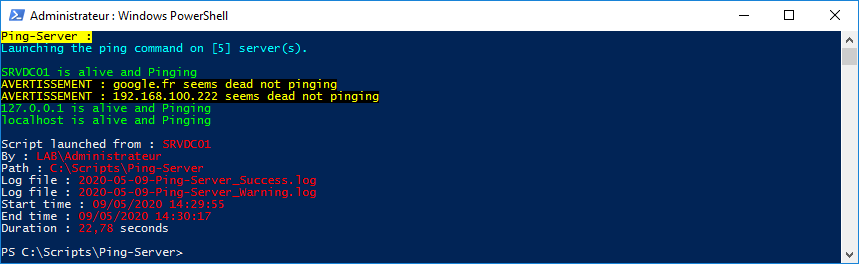
Code du script :
<#
.SYNOPSIS
    Ping multiple servers
.DESCRIPTION
    Check if servers are reachable with event logs creation and export results
.NOTES
    File name : Ping-Server.ps1
    Author : Pierre JACQUOT
    Date : 27/10/2015
    Version : 1.0
.LINK
    Website : https://www.pierrejacquot.yo.fr
    Reference : https://www.pierrejacquot.yo.fr/index.php/scripts/22-script-ping-server
#>

Clear-Host

Function Write-Log([string]$Output, [string]$Message) {
    Write-Verbose $Message
    ((Get-Date -UFormat "[%d/%m/%Y %H:%M:%S] ") + $Message) | Out-File -FilePath $Output -Append -Force
}

$StartTime = Get-Date -Format "dd/MM/yyyy HH:mm:ss"
[string]$Hostname = [Environment]::MachineName
[string]$Login = [System.Security.Principal.WindowsIdentity]::GetCurrent().Name
[string]$Workfolder = Split-Path $MyInvocation.MyCommand.Path
[string]$Date = Get-Date -UFormat "%Y-%m-%d"
[string]$TXTFile = $Workfolder + "\Servers.txt"
[string]$CSVFile = $Workfolder + "\$Date-Servers-Export.csv"
[string]$ReportFile = $Workfolder + "\$Date-Servers-Report.html"
[string]$LogFileOK = $Workfolder + "\$Date-Ping-Server_Success.log"
[string]$LogFileKO = $Workfolder + "\$Date-Ping-Server_Warning.log"
[array]$Servers = Get-Content -Path ".\Servers.txt" -ErrorAction SilentlyContinue
[int]$LineNumbers = $Servers.Count
[System.Collections.ArrayList]$ServerList = @()
[string]$Activity = "Trying to ping [$LineNumbers] server(s)"
[int]$Step = 1
[string]$Title = "[$Date] - Ping server(s) report on : $Hostname"

Write-Host "Ping-Server :" -ForegroundColor Black -BackgroundColor Yellow
If ((Test-Path ".\Servers.txt") -eq $False) {
    Write-Warning "TXT file [Servers.txt] does not exist."
    Write-Log -Output $LogFileKO -Message "TXT file [Servers.txt] does not exist."
}
ElseIf ($LineNumbers -eq 0) {
    Write-Warning "TXT file [Servers.txt] is empty."
    Write-Log -Output $LogFileKO -Message "TXT file [Servers.txt] is empty."
}
Else {
    Write-Host "Launching the ping command on [$LineNumbers] server(s)." -ForegroundColor Cyan
    Write-Host "`r"
    ForEach ($Server in $Servers) {
        [string]$Status = "Processing [$Step] of [$LineNumbers] - $(([math]::Round((($Step)/$LineNumbers*100),0)))% completed"
        [string]$CurrentOperation = "Ping : $Server"
        Write-Progress -Activity $Activity -Status $Status -CurrentOperation $CurrentOperation -PercentComplete ($Step/$LineNumbers*100)
        $Step++
        If (Test-Connection -ComputerName $Server -Count 2 -Quiet) {
            [string]$ServerStatus = "OK"
            Write-Host "$Server is alive and pinging." -ForegroundColor Green
            Write-Log -Output $LogFileOK -Message "$Server is alive and pinging."
        }
        Else {
            [string]$ServerStatus = "KO"
            Write-Warning "$Server seems dead not pinging."
            Write-Log -Output $LogFileKO -Message "$Server seems dead not pinging."
        }
        $ServerObject = [PSCustomObject]@{
            "Hostname / IP" = $Server
            Status = $ServerStatus
        }
        $ServerList.Add($ServerObject) | Out-Null
    }
}

$ServerList | Export-Csv -Path $CSVFile -NoTypeInformation -Delimiter ";" -Encoding UTF8
$EndTime = Get-Date -Format "dd/MM/yyyy HH:mm:ss"
[decimal]$Duration = [math]::Round((New-TimeSpan -Start $StartTime -End $EndTime).TotalSeconds,2)
[string]$PreContent = "<h1>$Title</h1>
<h2>Number of server(s) : <span class='PostContentBlue'>$LineNumbers</span></h2>"
[string]$SuccessLogFile = "Success log file : <span class='PostContentBlue'>$(Split-Path $LogFileOK -Leaf)</span><br/>"
[string]$WarningLogFile = "Warning log file : <span class='PostContentBlue'>$(Split-Path $LogFileKO -Leaf)</span><br/>"
[string]$PostContent = "<p id='PostContent'>Script launched from : <span class='PostContentBlue'>$Hostname</span><br/>
By : <span class='PostContentBlue'>$Login</span><br/>
Path : <span class='PostContentBlue'>$Workfolder</span><br/>
TXT file : <span class='PostContentBlue'>$(Split-Path $TXTFile -Leaf)</span><br/>
CSV file : <span class='PostContentBlue'>$(Split-Path $CSVFile -Leaf)</span><br/>
Report file : <span class='PostContentBlue'>$(Split-Path $ReportFile -Leaf)</span><br/>
$(If ((Test-Path $LogFileOK) -eq $True) {
    $SuccessLogFile
})
$(If ((Test-Path $LogFileKO) -eq $True) {
    $WarningLogFile
})
Start time : <span class='PostContentBlue'>$StartTime</span><br/>
End time : <span class='PostContentBlue'>$EndTime</span><br/>
Duration : <span class='PostContentBlue'>$Duration</span> second(s)</p>"
[string]$Report = $ServerList | ConvertTo-Html -As Table -CssUri ".\Style.css" -Title $Title -PreContent $PreContent -PostContent $PostContent
$Report = $Report -replace '<td>OK</td>','<td class="SuccessStatus">OK</td>'
$Report = $Report -replace '<td>KO</td>','<td class="CriticalStatus">KO</td>'
$Report | Out-File -FilePath $ReportFile -Encoding utf8

Write-Host "`r"
Write-Host "Script launched from : " -NoNewline; Write-Host $Hostname -ForegroundColor Red
Write-Host "By : " -NoNewline; Write-Host $Login -ForegroundColor Red
Write-Host "Path : " -NoNewline; Write-Host $Workfolder -ForegroundColor Red
Write-Host "TXT file : " -NoNewline; Write-Host (Split-Path $TXTFile -Leaf) -ForegroundColor Red
Write-Host "CSV file : " -NoNewline; Write-Host (Split-Path $CSVFile -Leaf) -ForegroundColor Red
Write-Host "Report file : " -NoNewline; Write-Host (Split-Path $ReportFile -Leaf) -ForegroundColor Red
If ((Test-Path $LogFileOK) -eq $True) {
    Write-Host "Success log file : " -NoNewline; Write-Host (Split-Path $LogFileOK -Leaf) -ForegroundColor Red
}
If ((Test-Path $LogFileKO) -eq $True) {
    Write-Host "Warning log file : " -NoNewline; Write-Host (Split-Path $LogFileKO -Leaf) -ForegroundColor Red
}
Write-Host "Start time : " -NoNewline; Write-Host $StartTime -ForegroundColor Red
Write-Host "End time : " -NoNewline; Write-Host $EndTime -ForegroundColor Red
Write-Host "Duration : " -NoNewline; Write-Host $Duration -ForegroundColor Red -nonewline; Write-Host " second(s)"
Write-Host "`r"
Exemple du fichier Ping-Server_Success.log créé automatiquement avec les machines qui sont joignables :
[09/05/2020 14:29:56] SRVDC01 is alive and pinging.
[09/05/2020 14:30:16] 127.0.0.1 is alive and pinging.
[09/05/2020 14:30:17] localhost is alive and pinging.
Exemple du fichier Ping-Server_Warning.log créé automatiquement avec les machines qui ne sont pas joignables :
[09/05/2020 14:30:10] google.fr seems dead not pinging.
[09/05/2020 14:30:15] 192.168.100.222 seems dead not pinging.
Cliquer ici pour visualiser un exemple du rapport Servers-Report.html créé automatiquement depuis mon poste.
Cliquer ici pour télécharger le fichier de style css.
Cliquer ici pour télécharger le script.
- Détails
- Écrit par Pierre JACQUOT
- Catégorie : Scripts
- Affichages : 257
Si vous disposez d'un grand nombre de runbooks, il peut-être intéressant de pouvoir récupérer tous les runbooks qui s’exécutent sur votre serveur Orchestrator. Ici nous allons voir la procédure à suivre afin d'exporter ces informations dans un fichier .csv.
Avec un script PowerShell :
Modifier les paramètres de sécurité de Powershell :
Par défaut, pour des raisons de sécurité l’exécution de scripts PowerShell est bloqué. Nous allons donc modifier une bonne fois pour toute ces paramètres de sécurité.
Ouvrir une fenêtre PowerShell en tant qu'Administrateur et tapez la commande suivante :
Set-ExecutionPolicy Unrestricted
Validez cette modification afin de changer la stratégie d’exécution :
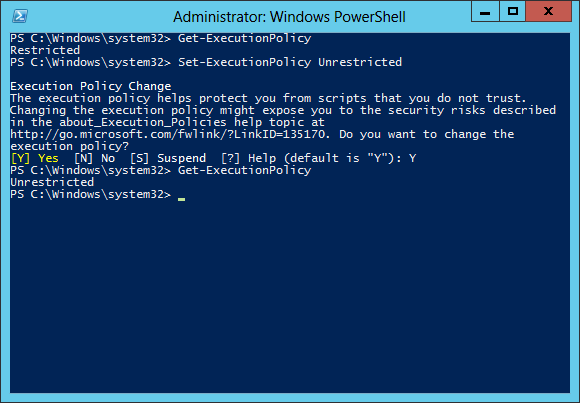
Vous pouvez désormais exécuter des scripts PowerShell sur votre serveur.
Installation :
Téléchargez le script et dézippez le dans le dossier de votre choix.
Après extraction, lancez le script PowerShell deploy.ps1 pour installer le module sur votre système.
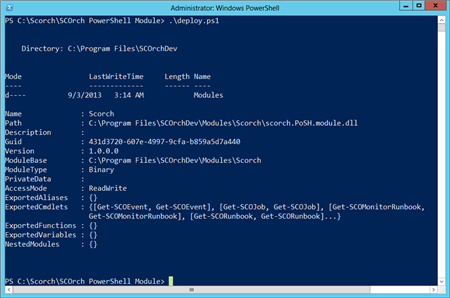
Le module est maintenant installé et enregistré comme un module disponible. Si vous avez besoin de le recharger, il suffit de lancer la commande suivante :
Import-Module Scorch
Pour obtenir la liste des commandes disponibles, vous pouvez taper la commande suivante :
Get-Command -Module Scorch
Sur votre serveur web Orchestrator, ouvrir le fichier de configuration web.config situé dans le dossier suivant : C:\Program Files (x86)\Microsoft System Center 2012\Orchestrator\Orchestration Console
Recherchez la clé URI de service pour se connecter au service web en HTTP ou en HTTPS.
Code du fichier :
<appSettings>
    <add key="ScoServiceUri" value="https://<domaine>:443/Orchestrator2012/Orchestrator.svc" />
</appSettings>
One-Liner :
#OL01 - Exporter les runbooks depuis Orchestrator dans un fichier .csv
Get-SCOMonitorRunbook -webserverURL https://<domaine>:443/Orchestrator2012/Orchestrator.svc -Verbose | Export-Csv -Path "C:\Temp\Orchestrator-Runbooks.csv" -NoTypeInformation -Delimiter ";" -encoding UTF8
- Détails
- Écrit par Pierre JACQUOT
- Catégorie : Scripts
- Affichages : 432

Si vous disposez d'un grand nombre de serveurs dans votre parc, il peut-être intéressant de pouvoir récupérer toutes les tâches planifiées qui s’exécutent sur vos serveurs distants. Ici nous allons voir la procédure à suivre afin d'exporter ces informations dans un fichier .csv.
Avec l'outil Windows Schtasks :
SchTasks.exe effectue les mêmes opérations que les Tâches planifiées dans le panneau de configuration de Windows.
One-Liners :
#OL01 - Exporter les tâches planifiées d'un serveur en local dans un fichier .csv
schtasks.exe /Query /FO CSV /V | ConvertFrom-Csv | Export-Csv -Path "C:\Temp\Tasks.csv" -NoTypeInformation -Delimiter ";" -encoding UTF8
#OL02 - Exporter les tâches planifiées de serveurs distants (stockés dans un fichier texte) dans un fichier .csv
(Get-Content -Path "C:\Temp\Servers.txt") | ForEach-Object { Schtasks.exe /Query /s $_ /V /FO CSV } | ConvertFrom-CSV | Export-CSV -Path "C:\Temp\Tasks-Servers.csv" -NoTypeInformation -Delimiter ";" -encoding UTF8
Exemple du contenu du fichier Servers.txt avec les hostnames des serveurs :
Server1
Server2
Server3
Problème avec l'outil Windows Schtasks :
La commande Schtasks et ses paramètres génèrent des problèmes d'affichage lorsque l'on souhaite exporter les données. En effet, des lignes sont répétées avec des en-têtes de colonnes vide.
Avec un script PowerShell :
Cliquer ici pour télécharger le script.
One-Liners :
#OL01 - Exporter les tâches planifiées d'un serveur en local dans un fichier .csv
.\Get-ScheduledTask.ps1 | Export-Csv -Path "C:\Temp\Tasks.csv" -NoTypeInformation -Delimiter ";" -encoding UTF8
#OL02 - Exporter les tâches planifiées de serveurs distants (stockés dans un fichier texte) dans un fichier .csv
(Get-Content -Path "C:\Temp\Servers.txt") | .\Get-ScheduledTask.ps1 | Export-Csv -Path "C:\Temp\Tasks-Servers.csv" -NoTypeInformation -Delimiter ";" -encoding UTF8
Exemple du contenu du fichier Servers.txt avec les hostnames des serveurs :
Server1
Server2
Server3
Page 3 sur 3


